
Calculators
Card Issuing Capacity Calculator
Work out how many card numbers a BIN or account range can hold, reserve space for growth, and plan allocations for each card programme before you configure your card system.
- Free, no sign-up
- Your data stays in your browser
What the card issuing capacity calculator does
The card issuing capacity calculator helps issuers and programme managers plan card-number inventory. For example, it shows the theoretical capacity of a BIN, the usable space in an account range after reserves, and how much each customer programme will use. It also flags requests that do not fit. That way, you can fix the plan before it reaches the scheme or your processor.
How the card issuing capacity calculator works out capacity
A card number (PAN) has three parts: the BIN, the account digits and one check digit. So, for a PAN of length L and a BIN of length b, the theoretical capacity is 10 to the power of (L − b − 1). For example, a 16-digit card with an 8-digit BIN has 7 account digits, which gives 10,000,000 possible numbers.
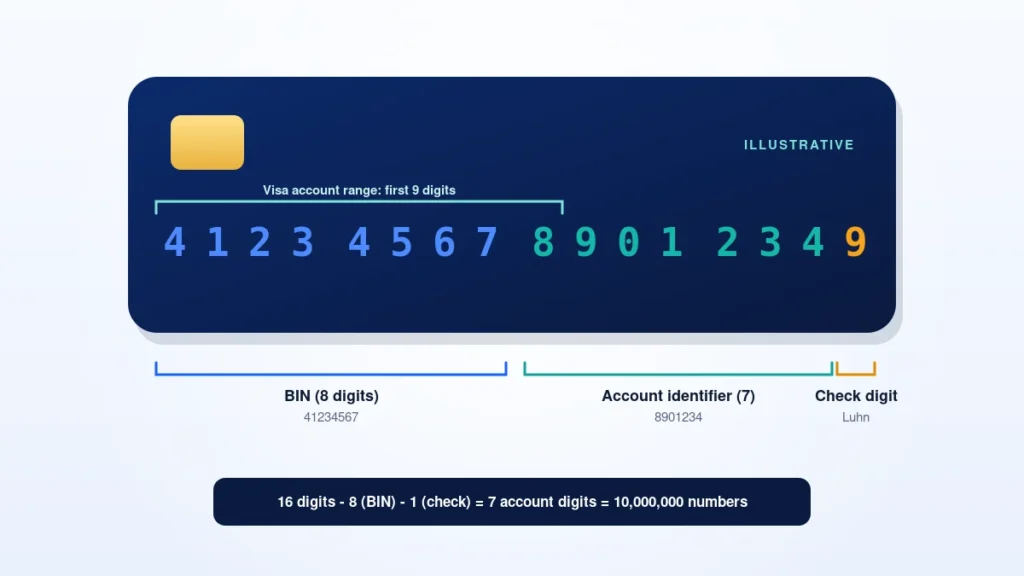
However, that figure is a ceiling, not a promise. Schemes assign account ranges, issuers reserve space, and card systems have their own rules. Therefore, the card issuing capacity calculator works on the ranges you enter, not on an assumed full BIN.
How to use the card issuing capacity calculator
- Choose the scheme and BIN length. First, enter your account range or parent range.
- Add reserves and existing allocations. As a result, this keeps space for growth and for cards already issued.
- Add each programme. Then enter the expected card volume and growth for every customer or product.
- Review the plan. Next, check the capacity map and any warnings, then download the plan as a CSV file.
Limitations
Results are planning estimates. In other words, actual card-number allocation must follow the issuer’s approved ranges, applicable scheme rules, processor configuration and card management system constraints.
Frequently asked questions
Does an 8-digit BIN always give 10 million cards?
No. In theory, it gives up to 10 million numbers on a 16-digit card. In practice, however, the usable number depends on the ranges you are assigned, your reserves and your system’s rules.
Is my data sent anywhere?
No. Instead, the card issuing capacity calculator runs in your browser. Moreover, it never needs a real card number, so do not enter one.
For the full background, read our guide to BIN management and segmentation, which explains 6-digit and 8-digit BINs, account ranges and how to plan for growth. You can also see how card issuance works from start to finish, or read Visa and Mastercard guidance for issuers.