
Utilities and checklists
Keyshare Generator
Split a synthetic test key into XOR components, rebuild a key from its parts and check DES, TDES and AES Key Check Values. Everything runs in your browser.
- Free, no sign-up
- Your data stays in your browser
Loading the Keyshare Generator…
This free keyshare generator helps issuing engineers, payment teams, developers and students practise key splitting with synthetic test data. It creates two or three XOR components and rebuilds the combined key. It also shows the Key Check Value (KCV) of every part. In addition, it explains each step, so you can follow every calculation.
What is a key component?
A key component is one part of a cryptographic key. When you XOR all the parts together, you get the original key back. For example, a two-key TDES key can be split into two components of 32 hex characters each.
Each part on its own reveals nothing about the key. That is why banks give each component to a different person, called a key custodian. As a result, no single person ever holds the whole key.
What is XOR?
XOR (exclusive OR) compares two bits. It gives 1 when the bits differ and 0 when they match. So 1010 XOR 0110 gives 1100.
The same rule works on bytes. For instance, 3B XOR 3B gives 00, and 0F XOR F0 gives FF. In addition, XOR undoes itself. If C2 is the key XOR C1, then C1 XOR C2 gives the key again. The keyshare generator uses exactly this rule, byte by byte.
What is a KCV?
A Key Check Value is a short fingerprint of a key. To make it, you encrypt a block of zeros (0000000000000000) with the key. Then you keep the first few hex characters of the result. Most systems keep six. For example, the well-known test key 0123456789ABCDEF FEDCBA9876543210 has the KCV 08D7B4.
The tool shows the exact convention it uses. For DES and TDES, it encrypts a zero block in ECB mode. For AES, it uses AES-CMAC by default, as in ANSI X9.24-1:2017, with plain AES-ECB as a legacy option. It also shows the number of characters kept. However, some vendors keep four characters or use a different method. So always check which convention your system follows.
A matching KCV is a useful check, but it is not proof. It does not show that a key is genuine, authorised or safe.
Why are parity bits used?
In a DES key, the last bit of every byte is a parity bit. With odd parity, each byte holds an odd number of 1-bits. DES does not use these bits when it encrypts, so they cannot change the KCV. Instead, they help systems spot typing errors.
There is a catch, though. XOR two odd-parity bytes and the result has even parity. Therefore, the keyshare generator tells you when it adjusts a parity bit. It never changes a component you typed without asking first.
How to use the keyshare generator
- Set up the key. First, choose DES/TDES (legacy) or AES (modern) and a key size. Then pick two or three components and a KCV length. DES keys also have a parity option.
- Generate test shares. Next, select Generate Test Key and Shares. The tool creates a random synthetic key and splits it.
- Or split your own key. Open the Split a key tab and paste a synthetic test key. The tool makes random shares and checks that they rebuild it.
- Or rebuild a key. Alternatively, open the Combine components tab and enter your own synthetic components. You can also enter an expected KCV to compare.
- Read the results. Finally, check the combined key, every KCV and the parity findings. The visual panel shows the XOR flow, each byte and its bits. You can also print a slip for each key custodian.
An example with the keyshare generator
Open the Combine components tab, choose 128-bit two-key TDES and select Use sample components. Then select Combine / Calculate. The two parts XOR to the test key 0123456789ABCDEF FEDCBA9876543210. Its KCV is 08D7B4, and each component has its own KCV.
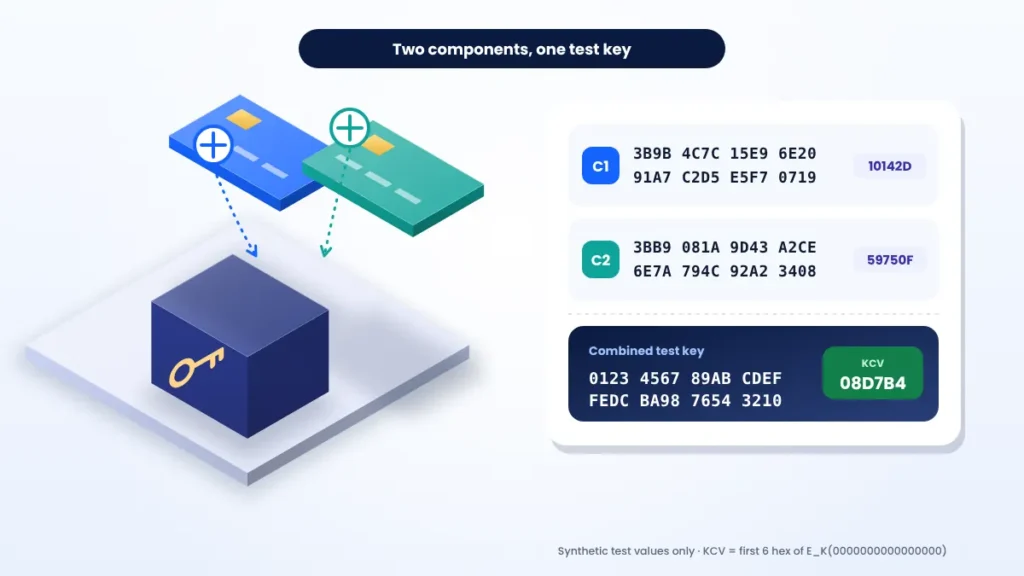
The raw XOR also has even parity in every byte. So the tool flips the last bit of each byte to restore odd parity. Even so, the KCV stays 08D7B4, because DES ignores parity bits.
Key custody: what the keyshare generator cannot do
Splitting a key into parts is only one piece of key management. A real process also needs named custodians, dual control, secure storage, controlled key loading and an audit trail. In practice, it also needs approved hardware, such as a hardware security module (HSM). The PCI Security Standards Council sets these rules for payment keys. Separate strings are not safe to share just because they are separate.
Frequently asked questions
Does this tool support production key ceremonies?
No. It is a learning and testing tool. A production key ceremony needs your approved procedures and an HSM.
Does the keyshare generator store what I type?
No. It runs in your browser. It saves nothing, puts nothing in the address bar and sends nothing to us.
Why does my KCV differ from my HSM’s?
Your system may use another convention. For example, it may keep four characters, or it may use a different algorithm.
Which key types does the keyshare generator support?
It supports DES (8 bytes), two-key TDES (16 bytes) and three-key TDES (24 bytes). It also supports AES-128, AES-192 and AES-256. The DES, TDES and AES maths come from the open-source node-forge library. We checked the results against OpenSSL and published test vectors.
This tool is intended for learning and software testing using synthetic values. It is not a certified cryptographic device and must not be used to generate, reconstruct, transport, or verify production payment keys. Follow your organisation’s approved key-management procedures and applicable security requirements.
To learn more, read what a card issuer does and how BIN management works. You can also decode a failed payment with the response code decoder.