
Calculators
Payment Processing Fee Calculator
Estimate what a payment provider charges, what you receive after fees, and your true effective rate. It works for one payment or a whole month of sales, in any currency.
- Free, no sign-up
- Your data stays in your browser
Loading the Payment Processing Fee Calculator…
This free payment processing fee calculator shows the real cost of accepting cards, transfers and online payments. Use it to compare offers from different providers, or to check that your settlement matches what you expected.
How to use the payment processing fee calculator
- Choose a mode. First, pick “Per transaction” for one payment, or “Monthly volume” for total sales over a period.
- Select your currency. Then note that the payment processing fee calculator supports naira, dollars, pounds, euros and other currencies.
- Enter your fee model. Next, copy the percentage, fixed fee and any cap from your provider’s pricing page or contract.
- Add the extras. Also, include tax on fees, monthly charges, refunds and chargebacks if they apply to you.
- Select Calculate. Then download the breakdown as a CSV file, or copy a summary for your records.
How the payment processing fee calculator works
The payment processing fee calculator follows the same steps a provider uses for a percentage-plus-fixed fee model:
- Percentage fee = sales amount × percentage rate.
- Fixed fees = number of transactions × fixed fee per transaction.
- Total fees = percentage fee + fixed fees + other fees, plus any tax on those fees.
- Net proceeds = gross sales − total fees − refunds − chargebacks.
- Effective fee rate = total fees ÷ gross sales × 100.
If your provider caps its fee, the calculator charges the cap whenever the percentage and fixed fee add up to more. In addition, all amounts are rounded to the smallest currency unit, such as the kobo or the cent.
A worked example with the payment processing fee calculator
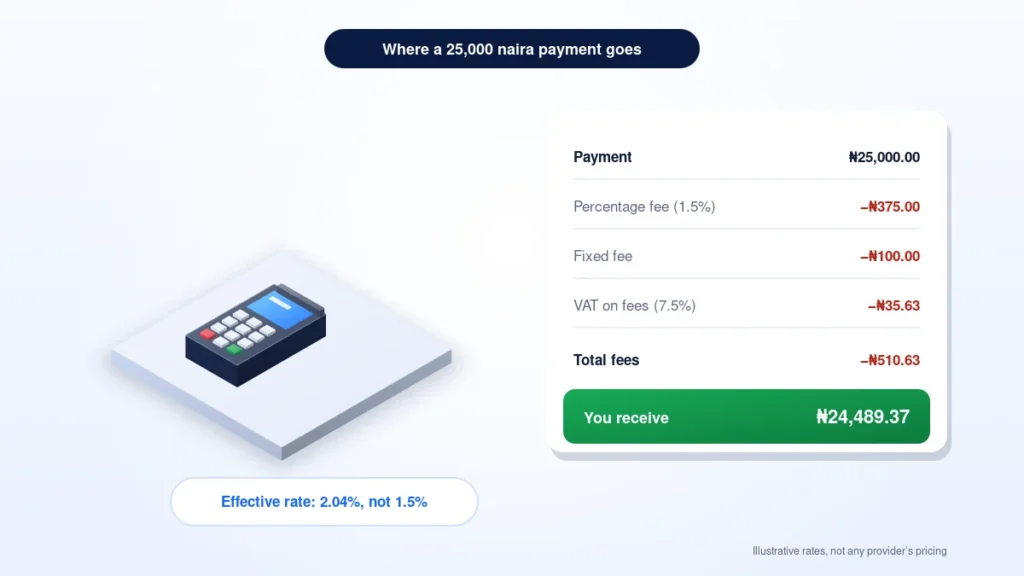
Suppose a provider charges an illustrative 1.5% + ₦100 per payment, capped at ₦2,000, and adds 7.5% VAT to its fees. On a ₦25,000 sale, the percentage fee is ₦375. With the ₦100 fixed fee, that is ₦475, and the VAT adds ₦35.63. So the total fee is ₦510.63, and you receive ₦24,489.37. That is an effective rate of about 2.04%, not the 1.5% in the headline price.
However, these rates are for illustration only. Always use the pricing in your own agreement.
Passing the fee on to your customer
Some merchants add the fee to the customer’s bill. Tick “Pass the fee on to my customer”, and the payment processing fee calculator works out the smallest amount to charge so that you still receive your full price. In the example above, you would charge ₦25,482.23 to receive ₦25,000. Before you do this, check your provider’s rules and your local consumer rules on surcharging.
What changes your payment processing fees
- Card type and origin. For example, international cards usually cost more than local ones.
- Payment channel. Similarly, online, POS and transfer payments often have different prices.
- Volume and negotiation. In addition, large merchants can often agree a lower rate.
- Tax. For instance, providers in Nigeria add 7.5% VAT to their fees.
- Refunds and chargebacks. Finally, many providers keep the original fee on a refunded sale and charge a separate fee for each chargeback.
Limitations of the payment processing fee calculator
This payment processing fee calculator gives an estimate, not a quote. It does not hold any provider’s real pricing, and it cannot know about tiered rates, currency conversion or settlement timing. Therefore, check the final figures against your provider’s statement.
Frequently asked questions
What does the payment processing fee calculator mean by effective fee rate?
It is the total you pay in fees as a percentage of your sales. In practice, because fixed fees, caps and tax change the real cost, it is often higher than the headline rate.
Why does my statement differ by a few kobo or cents?
Providers round each transaction separately. By contrast, the calculator rounds the total, so small differences are normal.
Do you store what I enter?
No. Instead, the calculator runs in your browser, and nothing you type is sent to us or anyone else.
Want to understand the fees better? Read what a payment gateway is, what a payment processor does and how POS transactions work. For official card security rules, see the PCI Security Standards Council.