
Calculators
Settlement Reconciliation Calculator
Check what your acquirer or payment provider should have paid you, compare it with what arrived, and see where to look when the two do not match.
- Free, no sign-up
- Your data stays in your browser
Loading the Settlement Reconciliation Calculator…
This free settlement reconciliation calculator helps finance and payment operations teams match settlements to sales. Enter totals from your sales and settlement reports, or a transaction summary, and the calculator shows the expected net settlement and the variance.
How the settlement reconciliation calculator works
The settlement reconciliation calculator uses one formula, with a clear sign convention:
- Expected net settlement = gross transactions − refunds − chargebacks − processing fees − other deductions − reserves withheld + reserve releases + other credits.
- Variance = actual settlement received − expected net settlement.
First, you enter every amount as a positive number. Then, for each line, you choose whether it is deducted, added or ignored. So, a positive variance always means you received more than expected, and a negative variance means you received less.
A worked example with the settlement reconciliation calculator
Suppose a merchant sold ₦12.5 million in a week. The settlement report shows refunds of ₦180,000, chargebacks of ₦95,000, fees of ₦192,500, a reserve of ₦250,000 held back and ₦120,000 released. The settlement reconciliation calculator gives an expected settlement of ₦11,902,500. However, only ₦11,807,500 arrived, so the variance is −₦95,000.
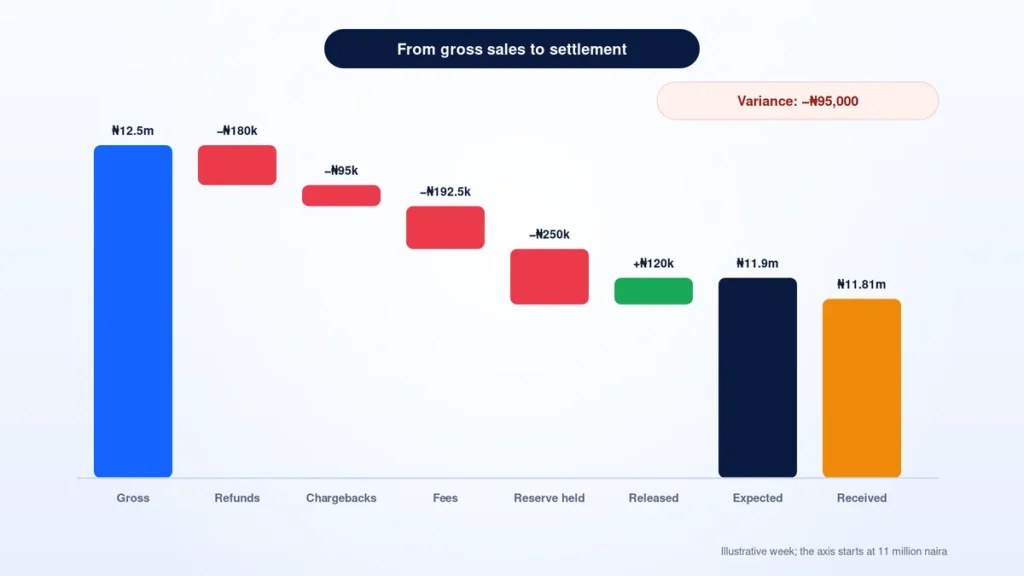
Because the shortfall equals the chargebacks line, the calculator suggests checking whether the chargebacks were deducted twice. Still, it cannot prove the cause; it only points you to the likely places.
How to read your result
The variance tells you what to do next:
- Zero. The settlement matches your sales after all deductions, so no action is needed.
- Negative. You received less than expected. Therefore, look for missing transactions, higher fees or a deduction taken twice.
- Positive. You received more than expected. For example, a reserve may have been released early, or a refund may not have been deducted yet.
- Very small. A difference of a few kobo or cents is usually rounding on fees or VAT. Even so, note it, because small gaps can add up over a month.
In addition, if the variance matches one line exactly, such as refunds or chargebacks, that line is the first place to check.
Where to look when settlement does not match
- Missing or extra transactions. First, compare your sales report with the settlement report line by line.
- Fee differences. Next, check rates, fixed fees, caps and VAT on fees against your agreement.
- Settlement timing. Also, sales after the daily cut-off often settle on the next business day. Our guide to card settlement explains why.
- Duplicate adjustments. For example, the same refund or chargeback deducted twice.
- Reserves. Finally, look for amounts held back or released that you did not expect.
A simple reconciliation routine
A regular routine catches errors while they are still easy to fix:
- Download both reports. First, export your sales report and your provider’s settlement report for the same period.
- Match the dates. Next, make sure both reports use the same cut-off time, so late sales are counted in the right day.
- Enter the totals. Then, add the totals to the settlement reconciliation calculator and note the variance.
- Investigate any gap. After that, work through the checklist above, starting with the line that matches the variance.
- Record and follow up. Finally, keep a log of each variance and raise unresolved gaps with your provider, with dates and amounts.
Most small businesses reconcile weekly. However, if you sell every day by card or transfer, a daily check is safer. Our guide on how to track business expenses in Excel shows how to keep a simple log.
Limitations
The settlement reconciliation calculator is only as accurate as the figures you enter. In addition, acquirers and processors apply their own settlement schedules, reserves, fee timing and refund rules, so always confirm a variance with your provider’s detailed report.
Frequently asked questions
What is a settlement reconciliation?
In short, it is the check that the money paid into your account matches your sales after fees, refunds, chargebacks and reserves. Doing it daily or weekly catches errors early.
Can I add my own adjustment lines?
Yes. Simply select “Add an adjustment”, name the line and choose whether to deduct or add it.
Is my data stored?
No. Instead, the settlement reconciliation calculator runs in your browser, and nothing you enter is sent to us.
Why is my settlement lower than my sales?
Usually, because your provider deducts fees, refunds, chargebacks and any reserve before it pays you. The calculator shows whether those deductions explain the whole gap.
Does it work for POS, online and transfer payments?
Yes. The formula is the same for any channel. Simply use the totals from the settlement report for that channel.
Do fees always stay the same?
No. Providers change their pricing, and regulators can change the rules on charges, so check your current agreement before you treat a fee difference as an error.
Learn more about what a card acquirer does, how payment processors work and how POS transactions work. For official card security standards, visit the PCI Security Standards Council.