
Reference and lookup
Payment Response Code Decoder
Type a response code from a declined card payment and see what it means, how likely a retry is to work, who should act and what to check next.
- Free, no sign-up
- Your data stays in your browser
Loading the Payment Response Code Decoder…
This free payment response code decoder explains the two-character codes that come back on every card payment. Support teams, merchants and payment operations staff can use it to read a decline, decide whether to retry and tell the customer what to do next.
What is a payment response code?
Every card payment ends with a response code. The issuer, or a switch acting for it, puts this code in field 39 of the ISO 8583 message. For example, 00 means approved, 51 means not enough money and 91 means the issuer could not be reached.
Many switches, including several in Nigeria, still use the 1987 version of ISO 8583. However, card schemes and processors also add their own codes. So, the payment response code decoder shows the standard meaning and flags any code that differs from it.
How the payment response code decoder works
- Search. First, type a code, such as 05, or a word, such as PIN, limit or fraud.
- Read the result card. Next, it shows the meaning, the category and whether a retry makes sense.
- Follow the steps. Then work through the common causes and the suggested next steps.
- Copy and share. Finally, copy the explanation into a support ticket or a reply to a customer.
The colours group the codes. Green codes are approvals. Amber codes are soft declines that may work later. Red codes are hard declines or card pick-ups, so you should not retry them. Purple codes point to a system or setup problem rather than the card.
A worked example with the payment response code decoder
A customer pays ₦45,000 at a supermarket, and the terminal shows a decline with code 51. The decoder shows “Not sufficient funds”, a soft decline. The customer should use another card or pay a smaller amount. On the other hand, code 91 at the same till means the issuer was unreachable. In that case, check that the bank did not debit the customer before you try again.
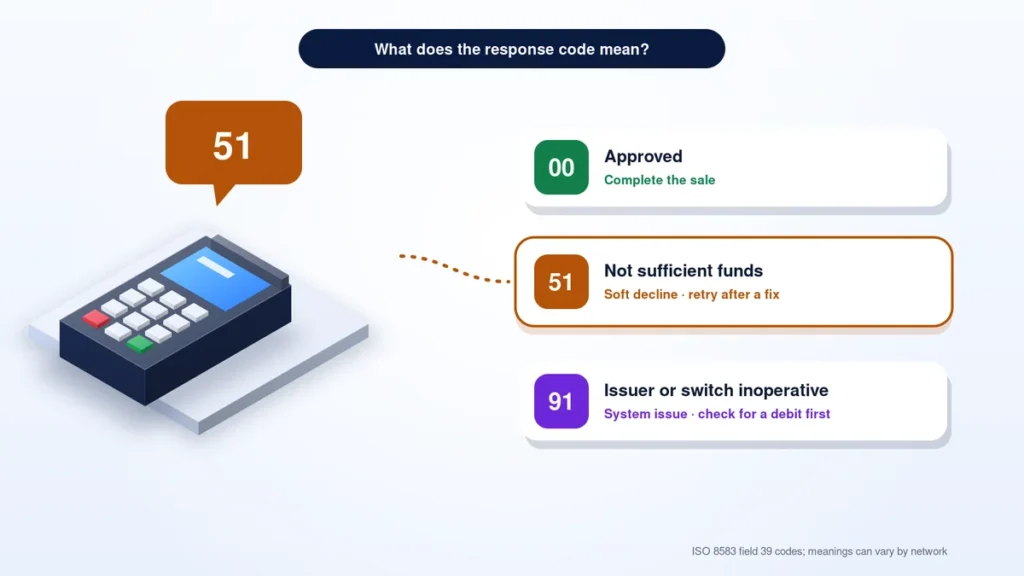
In short, the payment response code decoder tells you who should act. Some codes need the cardholder, some the merchant and some the acquirer or the issuer.
Retry rules at a glance
- Retry now: for example, 55 (incorrect PIN), with care, because too many tries block the card.
- Retry after a fix: for example, 51, 61, 91 and 96, once the customer or the bank fixes the funds, limit or system problem. Our guide on soft and hard card declines explains when a retry can work.
- Do not retry: for example, 04, 14, 41, 43, 57 and 59. Repeating these can trigger more fraud blocks.
Sources and limits of the payment response code decoder
We checked each code against the ISO 8583 (1987) values published by Interswitch, 2C2P and Acquired.com. Last reviewed on 12 October 2026. ISO keeps codes 45 to 50, 69 to 74, 76 to 89 and 97 to 99 in reserve, so the decoder does not guess their meaning. Always confirm a code with your own processor’s documentation, because networks can use codes differently.
Frequently asked questions
What does “do not honour” (05) mean?
It is a general decline from the issuer with no reason given. Often, a fraud rule or a channel restriction is the cause. The customer should call the bank or use another card.
Why was I debited when the payment failed?
Sometimes the approval arrives after the terminal has timed out. The system should then reverse the amount on its own. If it does not, the customer can raise a complaint with the bank, quoting the date, amount and terminal. Our guide on failed POS transactions explains the process.
Is my data stored?
No. The payment response code decoder runs in your browser and never asks for card numbers. We never see what you type.
To see where these codes come from, read how POS transactions work, what a payment processor does and how an issuer approves a payment.