A shop sells the newest phone for half its usual price. A “bank” page asks you to confirm your BVN. A job portal wants a small fee before your interview. Each one can look perfectly real, and each one can be a fake website. This guide shows you how to identify a fake website in a few minutes, with the warning signs, simple checks you can run, real Nigerian examples, and what to do if you have already paid or typed in your details.
Quick answer: To spot a fake website, read the web address letter by letter, because most fakes copy a real name with a small change, such as an extra word, a number, or an odd ending. Then check the payment options (fakes usually want a bank transfer up front), look for a real address and phone number, and search the site’s name with words like “scam” or “review”. A padlock icon only means the connection is encrypted; it does not prove the site is honest. If anything feels wrong, leave the site and go to the company’s official address yourself.
In this guide
- What is a fake website?
- Why the padlock does not prove a site is real
- 10 signs of a fake website
- How to check a website before you pay
- Fake website examples from Nigeria
- What to do if you used a fake website
- How to avoid fake websites in future
- Frequently asked questions
- Key takeaways
What is a fake website?
A fake website is a site built to trick you. It may copy a real brand, such as a bank, an online store, or a government agency, or it may invent a business that does not exist. Either way, its goal is your money, your login details, or your personal data.
| Type of fake website | What it pretends to be | What it wants |
|---|---|---|
| Copycat bank or wallet page | Your bank, a payment app, or the CBN | Your login, card details, PIN or OTP |
| Fake online store | A shop with huge discounts | A transfer for goods that never arrive |
| Fake investment site | A trading or crypto platform with fixed high returns | Your deposits, then “fees” to withdraw |
| Fake job or grant portal | An employer, an NGO or a government programme | An “application” or “processing” fee |
| Fake delivery or customs page | A courier or customs service | A small “release fee” and your card details |
Most visitors land on a fake website through a link, not by typing an address. That link usually arrives in a text, an email, a WhatsApp chat or a social media advert. A QR code can hide the same kind of link, which is why our QR code generator shows the full link inside every code it makes. So if you know how to recognise a phishing message, you will avoid many fake sites before they even load.
Why the padlock does not prove a site is real
Many people still think the padlock icon, or “https” at the start of the address, means a site is safe. It does not. The padlock only means that the data between you and the site is encrypted. However, it says nothing about who runs the site. A VPN has the same limit: our guide to what a VPN is explains why encryption alone cannot make a fake site safe.
Criminals know this. As far back as 2020, the Anti-Phishing Working Group found that about 77.6% of phishing sites used HTTPS, according to Digital Transactions. In other words, a padlock is now normal on fake sites too.
So treat the padlock as the minimum, not as proof. A real shop or bank needs it, but a fake one can have it as well.
10 signs of a fake website
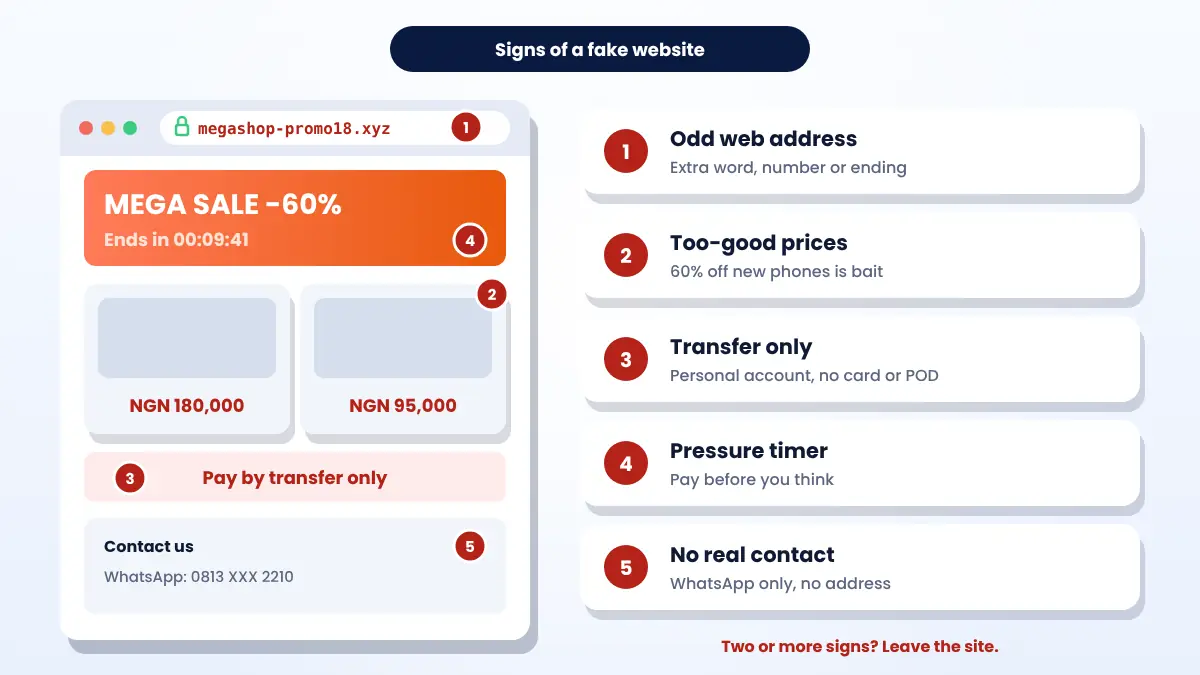
One sign is a reason to slow down. However, two or more usually mean you should leave.
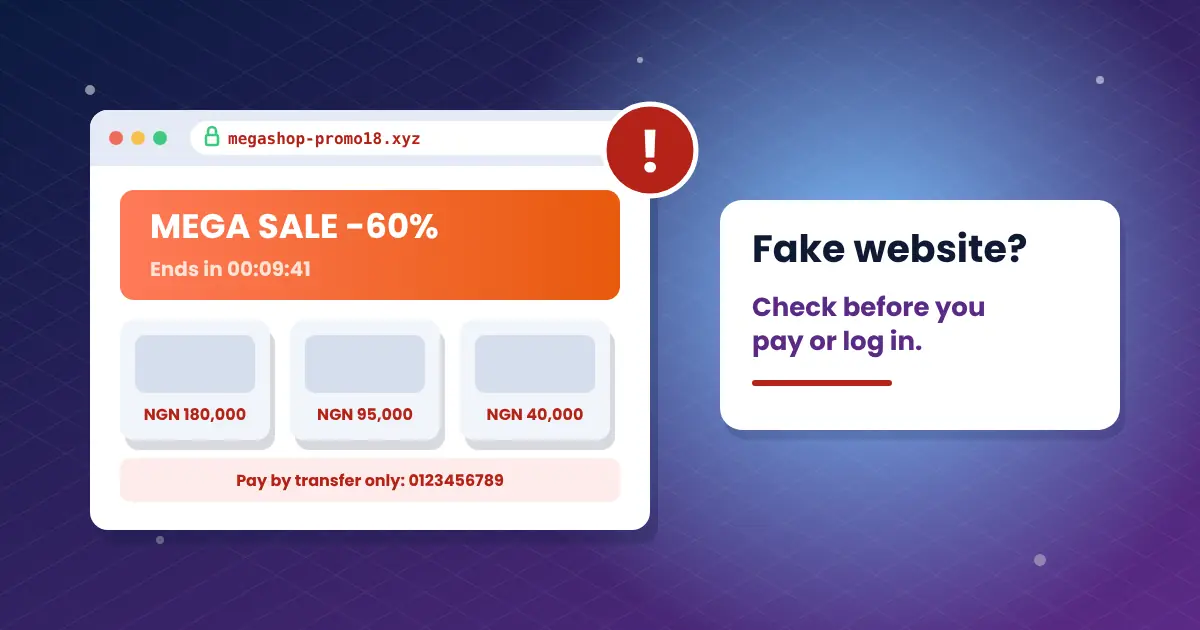
- The web address is slightly wrong. For example, an extra word (“-promo”, “-verify”), a number (“shop18”), a swapped letter, or an unusual ending such as “.xyz” or “.shop”.
- The prices are too good to be true. A new phone at 60% off is bait, not a bargain.
- It only accepts bank transfer to a personal account. Real stores offer card payment, a payment gateway, or pay on delivery.
- It creates pressure. Countdown timers, “only 2 left” banners, and “offer ends today” messages push you to pay before you think.
- The contact details are thin. There is no physical address, no landline, only a WhatsApp number or a free email address.
- The site is brand new. A domain registered a few weeks ago is a red flag for a shop that claims years of experience.
- The pages look copied. Blurry logos, broken links, spelling mistakes and empty “About us” or “Terms” pages are common.
- It asks for too much. A shop does not need your BVN, and no real site asks for your card PIN or OTP on a form.
- The reviews are odd. You find only five-star reviews on the site itself, but complaints or nothing at all elsewhere.
- Its social media is fresh. The page has few posts, recent creation dates, and comments turned off.
How to check a website before you pay
These checks take about five minutes and need no special skills:
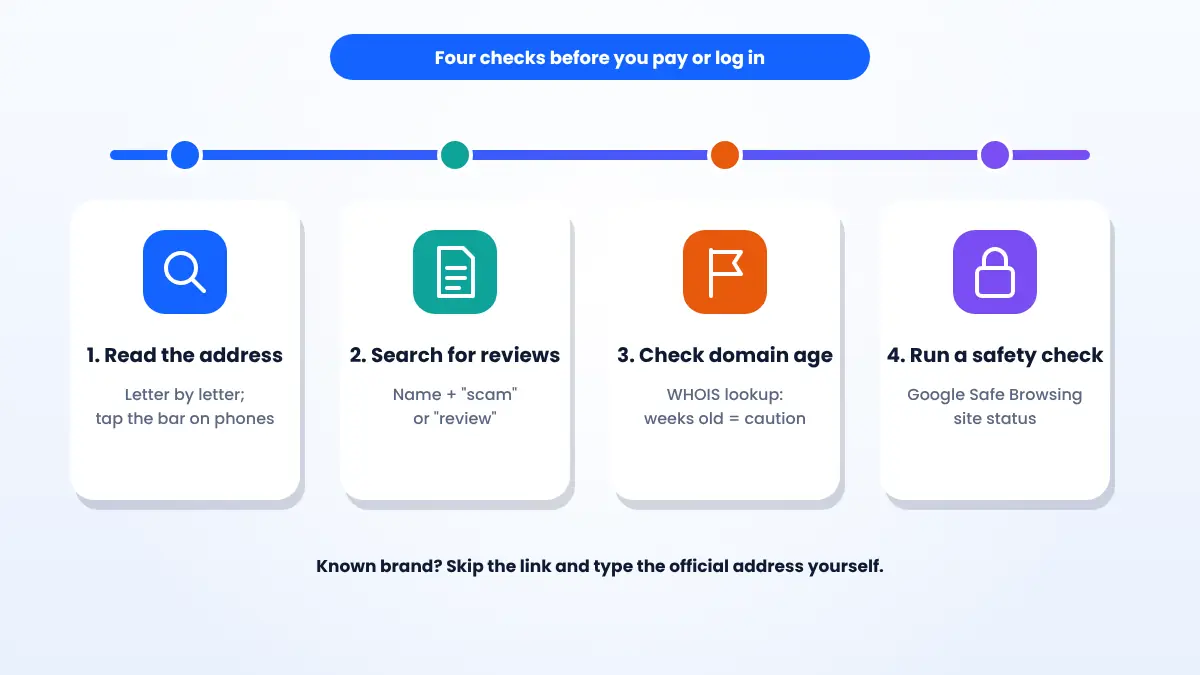
- Read the address bar slowly. Compare it with the address you know, letter by letter. On a phone, tap the address bar to see the full web address.
- Search the name with “scam” or “review”. If others have been cheated, you will often find posts on X, Facebook, Nairaland, or consumer forums.
- Check the site’s age. A WHOIS lookup tool, such as ICANN Lookup, shows when a domain was registered. A store that is weeks old deserves extra caution.
- Run a safety check. Google’s Safe Browsing site status tool tells you whether Google has flagged a site as unsafe. A clean result is not proof, but a warning is a clear stop sign.
- Test the contact details. Call the phone number, and search the address on a map. Fakes often list numbers that never answer or addresses that do not exist.
- Look at the payment page. A real checkout usually runs through a known payment gateway and asks for a one-time password from your own bank.
If a brand is well known, the safest check is simple: close the link and type the official address yourself, or use the official app.
Fake website examples from Nigeria
Fake websites often copy brands people already trust. For example, in May 2023, Konga warned customers about a site called konga18.com that used its name and asked buyers to pay in advance, according to Technology Times. Konga said it had no link to the site and told customers to use only konga.com.
Seasonal sales attract fakes too. Ahead of Black Friday in November 2023, the Federal Competition and Consumer Protection Commission (FCCPC) warned of a possible 135% rise in fake online stores, citing Netcraft, in an official advisory. It urged shoppers to buy only from trusted platforms.
Here is a typical example. Tobi sees an advert for a gaming console at ₦180,000, while every other shop charges about ₦450,000. The site looks polished and shows a padlock. However, its only payment option is a transfer to a personal account, the domain is three weeks old, and a quick search shows several people complaining that they never received their goods. Tobi closes the tab and keeps her money.
What to do if you used a fake website
Act fast, because speed improves your chances:
- Call your bank at once if you paid by card or transfer, or typed in banking details. Ask it to block your card and, for a transfer, to contact the receiving bank.
- Change your passwords if you entered a login, starting with your email and banking app. Then turn on two-step verification. If you use Gmail, follow our steps to secure your Gmail account.
- Collect evidence. Take screenshots of the site, the address bar, adverts, chats and payment receipts.
- Report the site. Report a fake store to the FCCPC through its complaints portal or on 0805 600 2020. You can also report fraud to the police or the EFCC, and report the site to Google Safe Browsing.
- Warn others. Report the advert on the platform where you saw it.
For a fuller plan, read our guide on how to protect your bank account online.
How to avoid fake websites in future
- Bookmark the sites you use often, such as your bank and favourite shops, and open them from your bookmarks.
- Use official apps for banking and big stores instead of links from messages or adverts.
- Prefer pay on delivery or card payments through a known gateway when you try a new shop.
- Use a separate card for online shopping, such as a virtual card with a small balance.
- Keep your browser updated, because modern browsers warn you about many known fake sites.
Frequently asked questions
Does the padlock mean a website is safe?
No. The padlock only means the connection is encrypted. Fake websites can get one easily, so you still need to check the address and the business.
Can a fake website steal my details if I only visit it?
Usually, simply visiting is low risk on an updated phone or computer. The main danger starts when you type in details, pay, or download a file.
How can I tell if a Nigerian online store is real?
Check that it offers card payment or pay on delivery, lists a real address and phone number, has a history of genuine reviews, and is not asking you to pay into a personal account.
What should I do if a website copies my bank?
Do not log in. Report the link to your bank through its official contact channels, and warn friends and family who use the same bank.
Are “.ng” websites always real?
No. A “.ng” or “.com.ng” ending can make a site look local, but criminals can register these too. Always check the full address and the business behind it.
Key takeaways
- A fake website copies a real brand or invents a business to take your money or details.
- Read the web address letter by letter, because small changes are the most common trick.
- A padlock only means encryption, so it does not prove a site is honest.
- Be wary of huge discounts, transfer-only payment, new domains, and missing contact details.
- If you paid or typed in details, call your bank at once, change your passwords, and report the site.