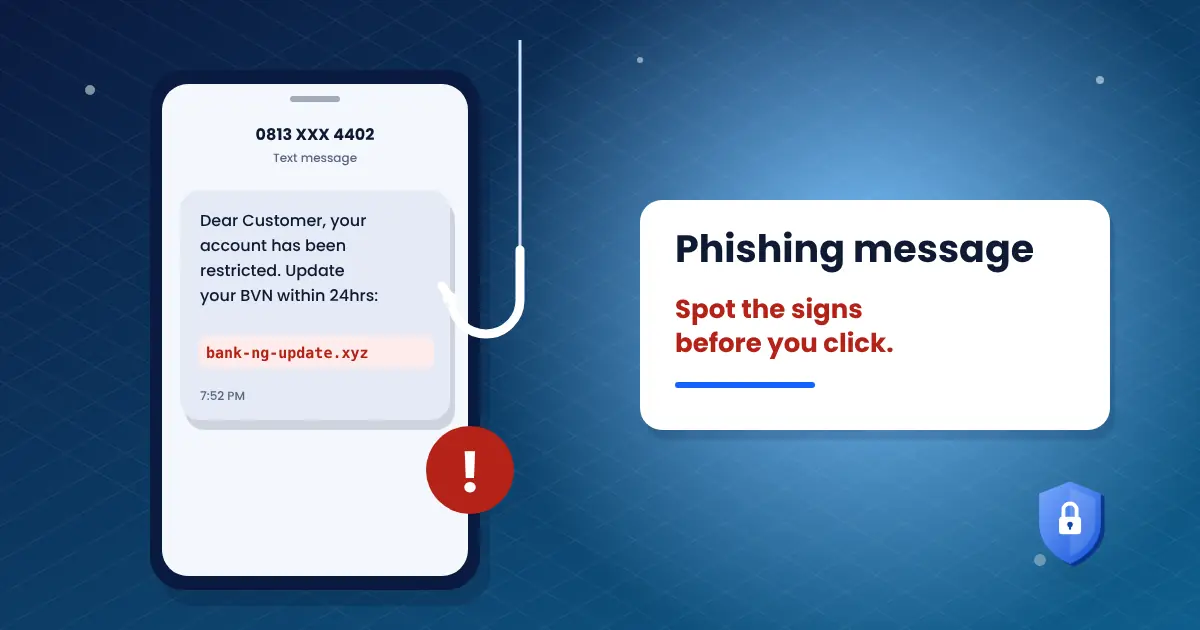
A text says your bank account will be blocked today unless you “update your BVN” through a link. It looks real. It even uses your bank’s name. This is a phishing message, and it is the most common way criminals start bank fraud in Nigeria. This guide shows you how to recognise a phishing message in seconds, with the warning signs, real examples, a safe way to check links, and what to do if you have already clicked.
Quick answer: A phishing message is a fake text, email, WhatsApp chat, or call that pretends to come from someone you trust, such as your bank, a network, a delivery company, or a friend. Its goal is to make you click a link, share a code, or send money. The clearest signs are urgency (“today”, “now”), a request for your PIN, OTP, password, or BVN, a link that does not match the real website, and an offer or threat that seems too big. When in doubt, do not click. Contact the company yourself, using the number on its official website or the back of your card.
In this guide
- What is a phishing message?
- Why a phishing message works
- 10 signs of a phishing message
- Common phishing message scams in Nigeria
- How to check a link in a phishing message
- An example of a phishing message
- What to do if you clicked a link in a phishing message
- How to report a phishing message in Nigeria
- How phishing is changing
- Frequently asked questions
- Key takeaways
What is a phishing message?
Phishing is a trick in which a criminal pretends to be a trusted person or organisation to steal your details or your money. A phishing message is the bait. It can arrive in several ways:
| Type | How it arrives | What it usually wants |
|---|---|---|
| Email phishing | An email that looks like it is from your bank, employer, or a service such as Gmail | Your login details, through a fake sign-in page |
| Smishing | An SMS, often with a short link | Your card details, BVN, or OTP |
| Vishing | A phone call from someone posing as bank or network staff | Your OTP, PIN or “verification” details |
| Social media and WhatsApp | A chat, often from a hacked friend’s account | Money, a code or your WhatsApp verification number |
The Central Bank of Nigeria described this pattern in a July 2026 alert: fraudsters pose as trusted organisations through emails, texts or calls to steal passwords and bank details.
Why a phishing message works
A phishing message does not need to hack your phone. Instead, it works on your feelings. Most messages use one of four levers:
- Fear. “Your account has been restricted.” “Your SIM will be blocked.”
- Urgency. “Act within 24 hours.” “Last warning.”
- Authority. The message claims to be from your bank, the CBN, the EFCC, or your network.
- Reward. “You have won ₦500,000.” “Claim your grant.”
These feelings push you to act before you think. That is why the most useful habit is simple: slow down. A real bank can wait five minutes while you check.
10 signs of a phishing message
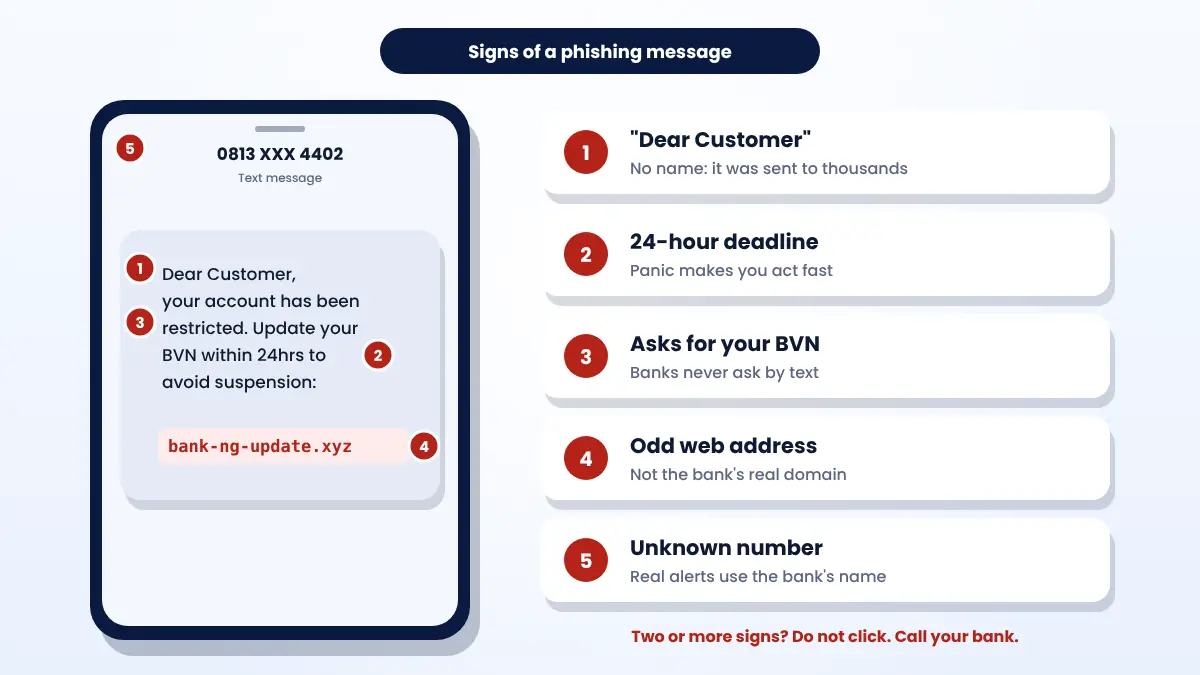
Look for these signs. One sign is a reason to be careful. Two or more usually mean the message is fake.
- It asks for your PIN, OTP, password, or CVV. Your bank will never ask for these by text, email, call, or WhatsApp. To cut down on these messages, learn how to block spam calls and texts.
- It creates panic or a deadline. For example, “Your account will be closed today.”
- The link looks wrong. The web address has extra words, spelling mistakes, or an unusual ending, such as a bank name followed by “-verify” or “.xyz”.
- It uses a short link. Links such as bit.ly hide the real address.
- The sender looks odd. It comes from a personal number, a free email address, or a name with a small spelling change.
- It does not use your name. It says “Dear customer” or “Dear user” instead.
- The offer is too good. Free money, a grant, or a prize you never entered for.
- It asks you to “update”, “verify,” or “reactivate”. This is the most common phishing request in Nigeria.
- The spelling or grammar is poor. However, newer AI-written messages can look perfect, so do not rely on this sign alone.
- It wants payment in an unusual way. For example, a “release fee”, a “customs charge” or airtime.
Common phishing message scams in Nigeria
Most phishing messages reuse a few stories. If you know them, you will spot them quickly:
| Phishing message | What it says | What is really happening |
|---|---|---|
| BVN or NIN update | “Your account is restricted. Update your BVN here.” | A fake page collects your account and card details |
| Account blocked | “Your account has been suspended. Call this number.” | A fake “agent” asks for your OTP |
| Fake credit alert | An SMS shows money sent to you “by mistake” | The criminal asks you to send the money back |
| Grant or loan offer | “CBN grant: claim ₦250,000 now.” | You pay a “processing fee” for money that never comes |
| Delivery or customs fee | “Your parcel is on hold. Pay ₦1,500.” | A fake payment page steals your card details |
| Job offer | “You are hired. Pay for your training kit.” | There is no job |
| Friend in trouble | A hacked WhatsApp contact asks for an urgent loan | The money goes to a criminal |
| “Is this you?” | A link to a video or photo of “you” | A fake login page steals your social media password |
A fake credit alert deserves extra care. Always check your balance in your banking app before you return any money. An SMS alone is not proof. Our guide on how to spot a fake bank alert covers the other warning signs. Our guide to how bank transfers work explains how a real transfer reaches your account.
How to check a link in a phishing message
Many phishing messages only work if you click. So check the link first:
- Press and hold the link. On most phones, this shows the full web address without opening it. On a computer, hover over the link with your mouse.
- Read the main domain. Look at the part just before the first single slash. For example, in “examplebank.com.ng/login”, the domain is “examplebank.com.ng”. In “examplebank.com.ng.secure-login.xyz/login”, the real domain is “secure-login.xyz”, so it is fake.
- Look for small changes. Criminals swap letters, such as “rn” for “m” or “0” for “o”, or add words like “-update” or “-verify”.
- Do not trust the padlock alone. The padlock only means the connection is encrypted. Fake sites can have one too. Learn how to identify a fake website before you log in.
- When in doubt, type the address yourself. Or open your bank’s official app instead of the link.
Real payment pages use known payment gateways. Our guide to what a payment gateway is shows what a real checkout looks like.
An example of a phishing message
Here is a realistic case, based on how these attacks usually unfold.
Amaka gets this SMS at 7:52 in the evening: “Dear Customer, your account has been restricted due to incomplete BVN. Update within 24hrs to avoid suspension: examplebank-ng-update.com”.
She notices four signs at once. The greeting is “Dear Customer”, not her name. There is a 24-hour deadline. The text also asks her to update her BVN. Finally, the link ends with an unfamiliar domain, not her bank’s official one.
So she does not click. Instead, she opens her banking app. Her account is fine, with no notices. She deletes the message and reports the number to her bank. If she had clicked, the fake page would have asked for her card number, PIN, and the OTP that follows. That is all a criminal needs to empty an account.
What to do if you clicked a link in a phishing message
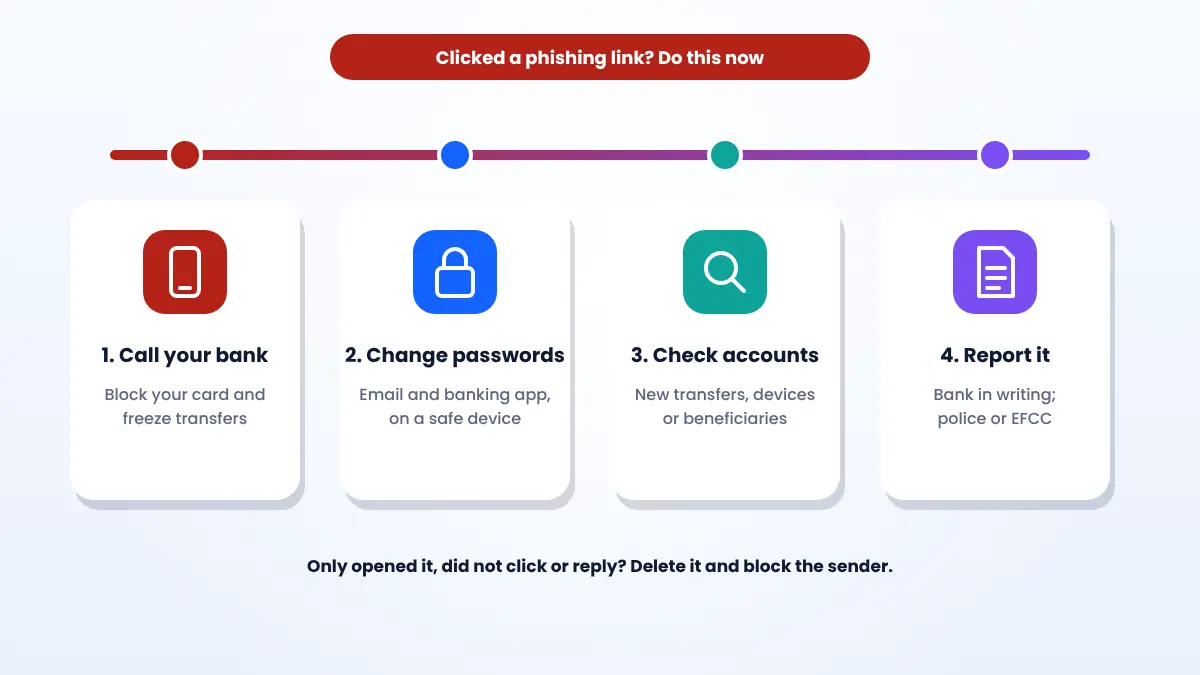
Do not panic, but act quickly:
- Call your bank at once if you entered any card, account, or banking details. Ask the bank to block your card and monitor your account. You can also dial your bank’s emergency USSD code to freeze transfers.
- Change your passwords for the account you entered, starting with your email and banking app. Use a different device if you can.
- Turn on two-step verification for your email and social media, preferably with an authenticator app. Our guide shows how to secure your Gmail account step by step.
- Check your accounts. Look for transfers, new beneficiaries, new devices, or login alerts you do not recognise.
- Report it. Tell your bank in writing, with the date and time. You can also report the fraud to the police or the EFCC.
If you only opened the message but did not click or reply, you are usually safe. Simply delete it and block the sender.
How to report a phishing message in Nigeria
Reporting helps your bank and network block the criminals faster:
| Where to report | When to use it |
|---|---|
| Your bank | Any message that uses your bank’s name, or if you shared details |
| Your mobile network | Scam SMS and calls. If the network does not resolve it, call the NCC consumer line on 622 |
| Police or EFCC | If you lost money or shared details |
| The platform | Use “Report” in WhatsApp, Facebook, Instagram, or Gmail |
To cut down on unwanted promotional texts, you can also activate the NCC’s Do Not Disturb service by texting STOP to 2442. However, this does not stop all fraudsters, because they often use personal numbers.
How phishing is changing
Phishing is not going away. The Anti-Phishing Working Group recorded about 3.8 million phishing attacks worldwide in 2025, according to its year-in-review report. It also found that scams grew on social media and that finance brands were among the most copied.
In Nigeria, the picture is mixed. NIBSS reported that losses to electronic payment fraud fell to ₦25.85 billion in 2025, down 51% from 2024, according to Techeconomy. Still, it named social engineering as the most common technique, with phishing among the growing threats.
Two new tricks are worth knowing:
- AI-written messages. Criminals now use AI to write clean, convincing messages. So good grammar no longer means a message is real.
- QR code phishing. A fake QR code on a poster or in an email leads to a fake payment or login page. Check the address after you scan, before you enter anything. If your business prints QR codes, make them with a tool that shows the full link, such as our free QR code generator.
Phishing also often comes before other attacks. For example, criminals use the details they steal to carry out a SIM swap and take over your phone number.
Frequently asked questions
Can I get hacked just by opening a phishing message?
Usually not. Opening a text or email is normally safe. The danger starts when you click a link, download a file, reply with details, or call the number in the message.
Will my bank ever send me a link to update my BVN?
Treat any such link as fake. Banks do not ask you to update your BVN, PIN, or OTP through a link in an SMS or WhatsApp message. If you are unsure, call your bank or visit a branch.
How can I tell a fake credit alert from a real one?
Check your balance in your banking app or by USSD. A real credit shows in your balance. A fake one only exists as an SMS. Never send back money until your bank confirms it arrived.
What should I do if a friend’s WhatsApp asks me for money?
Call your friend on a normal phone call before you send anything. Their account may have been hacked. Even a familiar voice is not proof on its own, because criminals can now clone voices with AI, as our guide to deepfake scams explains.
Is a message with my name always real?
No. Criminals often have your name and phone number from data leaks. Check the request itself, not just the greeting.
Should I reply “STOP” to a phishing SMS?
No. Replying confirms that your number is active. Simply delete the message and block the sender.
Key takeaways
- A phishing message pretends to be from someone you trust, so you click, share a code, or send money.
- The biggest signs are urgency, a request for your PIN, OTP, password, or BVN, and a link that does not match the official website.
- Press and hold a link to read the real domain before you open it.
- Your bank will never ask for your PIN, OTP, or password by text, email, call, or WhatsApp.
- If you clicked and entered details, call your bank at once, change your passwords, and report it.
- To stop the next attack, learn how to protect your bank account online.