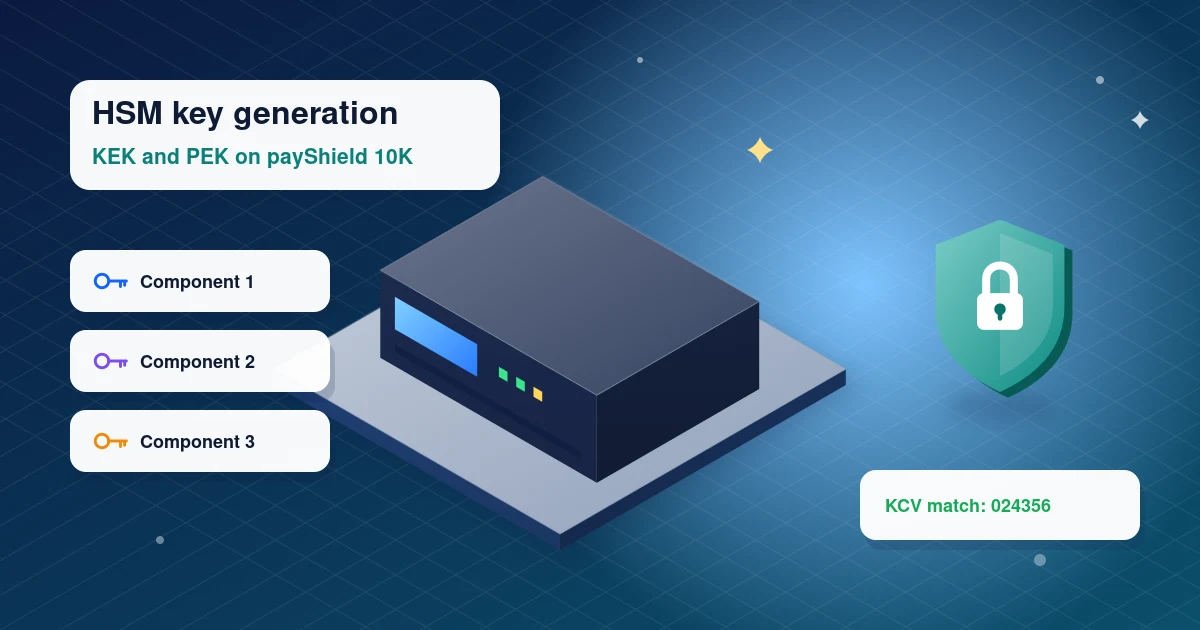
Every card programme depends on a small set of secret keys, and a card personalisation (perso) bureau needs two of them before it can print a single card: a key-encryption key (KEK) and a PIN encryption key (PEK). This tech tutorial walks through HSM key generation on a Thales payShield 10K, step by step. You will create both keys as three components under dual control, store them as Thales key blocks, and export them under a zone master key (ZMK) for a bureau that cannot yet accept key blocks.
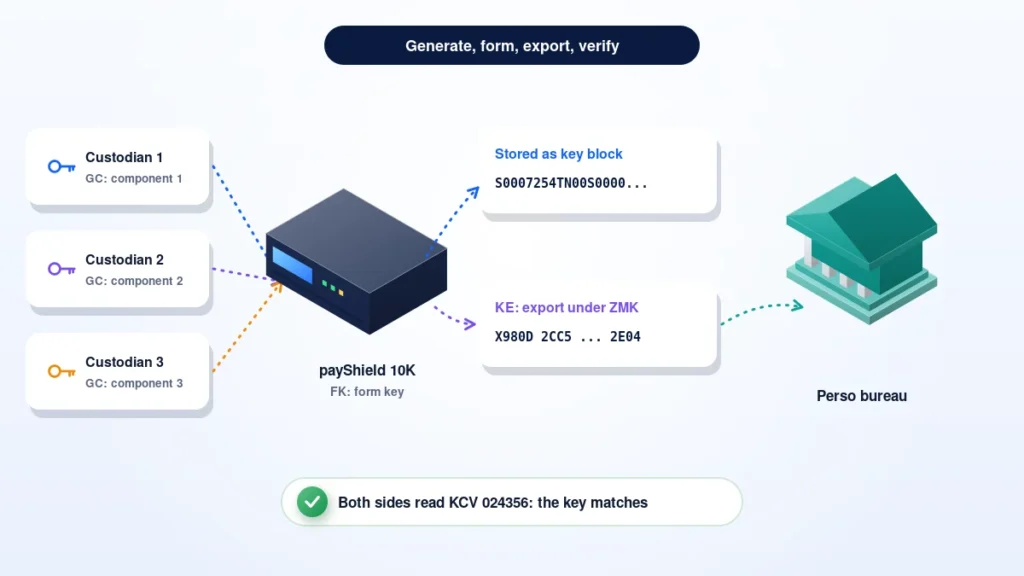
Quick answer: HSM key generation on a payShield 10K for a perso bureau takes three console commands per key. First, GC generates each clear component (three custodians, three components). Next, FK forms the key from the components and stores it as a key block under the local master key (LMK). Finally, KE exports the key under the shared ZMK in the format the bureau supports, here ANSI X9.17 (scheme X). Both sides then compare the key check value (KCV) to confirm the key arrived intact.
In this guide
- What you are building, and why
- Before you start HSM key generation
- Key blocks vs variant and X9.17 formats
- Step 1: Generate three components with GC
- Step 2: Form the key with FK
- Step 3: Export the key under the ZMK with KE
- Step 4: Repeat the HSM key generation for the PEK
- Step 5: Verify the HSM key generation with the Perso Bureau
- How to read a key block header
- Visa key blocks: the TR-31 format
- Common HSM key generation mistakes
- Security checklist for HSM key generation
- Frequently asked questions
- Key takeaways on HSM key generation
What you are building, and why
All values in this HSM key generation guide are dummy values created for illustration. They follow a real KEK and PEK ceremony for a perso bureau, but they are not live or test keys from any issuer processor.
During card issuance, the issuer processor sends card data to a perso bureau, which writes it onto the chip and the magnetic stripe. That data includes secrets, so it must travel encrypted. Two keys do that job:
- The KEK protects other keys that the issuer processor sends to the bureau. It is a key-encryption key, so it never encrypts card data directly.
- The PEK protects PIN data, for example, the PIN blocks the bureau uses to print PIN mailers.
Both keys must exist inside the issuer processor’s HSM and inside the bureau’s HSM, with the same value. HSM key generation therefore has two goals: create a strong random key without any one person knowing it, and move it safely to the bureau.
Before you start HSM key generation
Prepare these items before the key ceremony begins:
| Requirement | Why it matters |
|---|---|
| HSM in authorised state | Also, exporting a key to a non-key-block format needs authorisation, so the console shows “Online-AUTH” |
| A key block LMK (here, LMK ID 0) | The new keys are stored as Thales key blocks under this LMK |
| A ZMK already shared with the bureau | Then KE can export each new key under it; in this example, the ZMK has key usage 52 |
| Three key custodians | Each one generates and holds one component, so no single person knows the key. |
| A witness and a ceremony log | Finally, an auditor can confirm who did what, and when |
Run the HSM key generation ceremony in a secure room under dual control. Keep phones out, and record each component on a sealed key component form, not in a text file or email. To practise the XOR and KCV maths with dummy values first, try our free keyshare generator.
Key blocks vs variant and X9.17 formats
This ceremony uses two formats, so it helps to know the difference before you begin.
| Feature | Key block (Thales “S”, TR-31 “R”) | Variant (“U”, “T”) and X9.17 (“X”, “Y”) |
|---|---|---|
| What is encrypted | The key plus a header that states its usage, algorithm, mode of use, and exportability | Only the key value |
| Integrity check | Yes, a MAC covers the header and the key, so any change is detected | No, so a changed or swapped key can go unnoticed |
| Usage binding | Strong, since the HSM refuses to use a PEK as a data key | Weak or none, because the receiving system decides how the key is used |
| Key halves | Protected as one unit | X9.17 encrypts each half separately, so halves can be swapped or replaced |
| PCI PIN status | Required by PIN Security Requirement 18-3 | Legacy, allowed only where a party cannot yet support key blocks |
In short, key blocks are more secure and are the better choice wherever both sides support them. The PCI key block requirement phases in this protection, and Visa’s bulletin on the extended dates set the last phase for 1 January 2025. For the wider card security picture, our PCI DSS readiness checklist includes key management under items 3.6 and 3.7.
That is why, in this HSM key generation ceremony, the keys live inside the issuer processor’s HSM as key blocks. The issuer processor uses the X9.17 format only for the transfer, because the bureau does not yet support key blocks. Record that exception, and agree a date for the bureau to move to key blocks.
Step 1: Generate three components with GC
Each custodian runs GC (Generate Key Component) once. For the KEK, the console prompts and answers are:
| Prompt | Entry | Meaning |
|---|---|---|
| Enter LMK id | 0 | Use the key block LMK in slot 0 |
| Enter key length | 2 | Double-length triple DES (16 bytes) |
| Enter key scheme | S | Store the component as a Thales key block |
| Enter Key Usage | 54 | The key block usage this issuer processor used for the KEK; check your Key Usage Table |
| Enter Mode of Use | N | No special restrictions |
| Enter component number | 1, then 2, then 3 | Each custodian creates one component |
| Enter Exportability | S | Sensitive, so the key may later be exported in a non-key-block format |
| Enter Optional Blocks? | N | No optional header blocks |
The HSM then prints the clear component, the component encrypted under the LMK, and the component’s KCV. For example, with dummy values:
| Component | Encrypted header (start) | KCV |
|---|---|---|
| 1 | S0007254TNc1S0000… | 294679 |
| 2 | S0007254TNc2S0000… | 156415 |
| 3 | S0007254TNc3S0000… | A76B1E |
Each custodian copies the clear component onto a sealed form and records the KCV. Notice “c1”, “c2” and “c3” in the header: the key version field marks each value as a component, not a working key.
Step 2: Form the key with FK
Next, run FK (Form Key from Components). The custodians enter their components one at a time, out of sight of each other:
| Prompt | Entry |
|---|---|
| Enter LMK ID | 0 |
| Enter key length | 2 |
| Enter key scheme | S |
| Enter component type | X (clear components, combined by XOR) |
| Enter number of components | 3 |
| Enter Key Usage | 54 |
| Enter Mode of Use | N |
| Enter Key Version Number | 00 |
| Enter Exportability | S |
| Enter Optional Blocks? | N |
After each entry, the HSM shows that component’s KCV. Then the custodian confirms it matches the form before typing Y to continue. Finally, the HSM prints the key under the LMK, beginning S0007254TN00S0000…, and the KEK check value, 024356 in our dummy example.
Step 3: Export the key under the ZMK with KE
Now export the KEK so the bureau can import it. Run KE (Export Key):
| Prompt | Entry | Meaning |
|---|---|---|
| Enter LMK ID | 0 | The LMK that protects the key today |
| Enter key scheme | X | ANSI X9.17 double-length format, which the bureau supports |
| Enter ZMK | S0007252TN00E0000… | The shared ZMK, as a key block with usage 52 |
| Enter key under LMK | S0007254TN00S0000… | The KEK from Step 2 |
The HSM returns the KEK under the ZMK, for example X980D 2CC5 2EF1 1798 1E2E FB1A 90B3 2E04, and the same check value, 024356. Because the KCV matches the value from Step 2, you know the export used the right key.
Step 4: Repeat the HSM key generation for the PEK
The PEK follows the same three commands. Only a few entries change:
| Item | KEK | PEK |
|---|---|---|
| Key usage | 54 | P0 (PIN encryption) |
| Component KCVs (dummy) | 294679, 156415, A76B1E | A6A0DB, F2B5AA, FEBA2A |
| Key block header | S0007254TN00S0000… | S00072P0TN00S0000… |
| Key check value (dummy) | 024356 | FCCDA8 |
| Exported under ZMK (scheme X) | X980D 2CC5 … 2E04 | X7008 2E38 … F89E |
As a result, the issuer processor ends the ceremony with two key blocks in its key database and two X9.17 cryptograms to send to the bureau.
Step 5: Verify the HSM key generation with the perso bureau
Send the exported cryptograms through the agreed secure channel, and send the KCVs separately. Then the bureau imports each key under the same ZMK and reads back the KCV. If both sides see 024356 for the KEK and FCCDA8 for the PEK, the HSM key generation is complete. Finally, record the KCVs, the date, and the custodians’ names in the key ceremony log, and destroy or lock away the component forms according to your key management policy.
How to read a key block header
The first 17 characters of each key block tell the HSM how it may use the key. Take the KEK header S0007254TN00S0000 as an example:
| Characters | Value | Meaning |
|---|---|---|
| 1 | S | Thales key block scheme |
| 2 | 0 | Key block version: protected under a triple DES key block LMK |
| 3 to 6 | 0072 | Total length of the key block |
| 7 to 8 | 54 | Key usage |
| 9 | T | Algorithm: triple DES |
| 10 | N | Mode of use: no special restrictions |
| 11 to 12 | 00 | Key version number (c1 to c3 for components) |
| 13 | S | Exportability: sensitive |
| 14 to 15 | 00 | Number of optional blocks |
| 16 to 17 | 00 | LMK identifier, here LMK 0 |
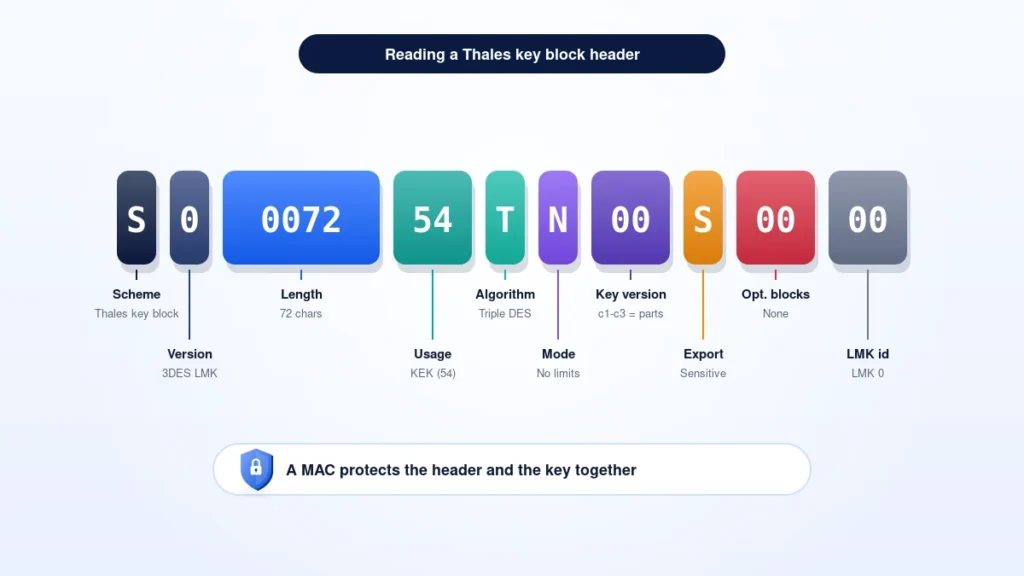
Because a MAC covers this header, nobody can change the usage from 54 to P0, or the exportability from N to S, without the HSM rejecting the key.
Visa key blocks: the TR-31 format
The keys in this ceremony are Thales key blocks, and only a payShield that holds the same LMK can read them. Keys that travel between organisations use an open format instead. For example, on a Visa programme, the test keys Visa shared arrived as TR-31 key blocks with headers like these:
| Header | Key | What it does |
|---|---|---|
| B0080P0TB00S0000 | PIN encryption key (PEK) | It encrypts PIN blocks, so mode B means it can both encrypt and decrypt. |
| B0080V2TC00S0000 | PIN verification key | It creates and checks the Visa PIN verification value (PVV), so mode C means generate and verify. |
| B0080E0TN00S0000 | EMV issuer master key | It derives each card’s key for chip cryptograms (ARQC), so mode N means no special restrictions. For a plain-English view of how the chip uses that key, see the IMK entry in our EMV glossary. |
TR-31 started as an ASC X9 technical report and is now the ANSI X9.143 standard, with ISO 20038 as the international version. As a result, any HSM that supports it can read the key, so it works between a card scheme, an issuer processor and a perso bureau. Likewise, the AWS Payment Cryptography key reference lists the same usages: P0 for PIN encryption, V2 for the Visa PIN verification key and E0 for the EMV master key for application cryptograms.
How to read a TR-31 header
| Characters: value | Meaning |
|---|---|
| 1: B | To begin with, the version: triple DES with key derivation binding (D is the AES version) |
| 2 to 5: 0080 | Then the total length of the key block: 80 characters |
| 6 to 7: P0, V2 or E0 | Then the key usage, which fixes what the key may do |
| 8: T | After that, the algorithm: triple DES |
| 9: B, C or N | Also, the mode of use |
| 10 to 11: 00 | In addition, the key version number |
| 12: S | Similarly, exportability: sensitive |
| 13 to 14: 00 | Then the number of optional blocks |
| 15 to 16: 00 | Finally, a reserved field |
Thales key block vs TR-31 key block in HSM key generation
| Feature | Thales key block (this ceremony) | TR-31 key block (Visa test keys) |
|---|---|---|
| First characters | S, then 0 for a triple DES LMK | Instead, just the version letter, here B |
| Header length | 17 characters, including the S | 16 characters |
| Last two header characters | The LMK identifier, so for example 00 means LMK 0 | Instead, a reserved field, always 00 here |
| Protected by | In particular, the HSM’s own local master key | Instead, a key both parties share, such as a ZMK |
| Key usage codes | Standard codes such as P0, and also Thales numeric codes such as 52 and 54 | However, only standard codes, such as P0, V2 and E0 |
| MAC | 4 bytes, so a double-length key block is 72 characters | In contrast, 8 bytes, so the same key block is 80 characters |
| Who can read it | Only a Thales HSM with the same LMK, because the LMK never leaves it | On the other hand, any HSM that supports TR-31 and holds the shared key |
So the difference is the format family, not the card scheme. A Thales key block stores and uses keys inside your own HSM, while TR-31 moves keys between organisations. When a TR-31 key block arrives, the issuer processor imports it under the shared ZMK, and the payShield stores it again as a Thales key block under its LMK. Before you use the key, compare its KCV with the value the sender gave you.
Common HSM key generation mistakes
- KCV mismatch at the bureau. Usually, one side used a different ZMK or the wrong key scheme. Therefore, confirm the ZMK check value and the scheme (X, U, or T) before you export.
- “Key not exportable” error. The key was formed with exportability N or E, which blocks export to a non-key-block format. Instead, form it again with S, and only when the bureau truly needs a legacy format.
- Wrong component KCV during FK. A custodian mistyped a component. Stop, clear the entry, and type it again; never continue with a mismatched KCV.
- Wrong LMK ID. The key ends up under a different LMK, so your host cannot use it. Always confirm the LMK ID with the HSM administrator first.
- Clear components left behind. Screens, printouts, photos, or text files expose the key. So, clear the console and destroy notes at the end of the ceremony.
Security checklist for HSM key generation
- Use at least three custodians, and never let one person hold two components.
- Print components to sealed forms or a secure printer where your HSM supports it, rather than reading them off a screen.
- Keep keys as key blocks everywhere inside your environment.
- Export in variant or X9.17 format only for a named counterparty, and record the exception.
- Verify every key by KCV, and log the ceremony with signatures.
- Rotate the KEK and PEK on the schedule in your key management policy.
Frequently asked questions
What is the difference between a KEK and a ZMK?
Both are key-encryption keys. However, a ZMK is shared between two organisations to exchange other keys, while a KEK here protects keys sent to the perso bureau. In this ceremony, the ZMK protects the KEK and PEK during transfer.
Why export in X9.17 if key blocks are more secure?
Only because the bureau cannot yet import key blocks. The issuer processor keeps the keys as key blocks internally and uses X9.17 for the transfer alone, as a documented exception.
What is a key check value?
A KCV is the first six hex digits of a block of zeros encrypted with the key. Both sides compute it, so a match proves they hold the same key without revealing it.
Can one person perform HSM key generation alone?
No. Dual control and split knowledge require several custodians, so no single person ever knows the full key.
Does this process work on a payShield 9000?
The console commands GC, FK, and KE are similar on earlier payShield models. Still, check the prompts and key usage codes in the manual for your firmware version.
Key takeaways on HSM key generation
- HSM key generation for a Perso bureau uses GC, FK, and KE for each key.
- Keep keys as key blocks inside your HSM, and export in X9.17 only when the other party cannot accept key blocks.
- Key blocks bind usage and exportability to the key with a MAC, which variant and X9.17 formats cannot do.
- Keys from a card scheme such as Visa arrive as TR-31 key blocks, which the HSM imports under the ZMK and stores again as Thales key blocks.
- Compare KCVs at every step, and log the ceremony under dual control.
Want the wider picture? Read how an issuer processor completes card issuance, what a card issuer does, or how issuers plan BIN management.