Every time you check your bank balance, search for a product online, or scroll through your phone contacts, a database is working in the background. So, what is a database? This guide explains it in plain English, shows how databases work, compares them with spreadsheets, and walks through the main types, with real examples from everyday life and business.
Quick answer: A database is an organised collection of information stored on a computer, so it can be found, updated, and protected easily. Most databases keep data in tables of rows and columns, a bit like a very powerful spreadsheet. A program called a database management system (DBMS) stores the data, answers questions about it and controls who can see or change it. Banks, online shops, schools and phone apps all depend on databases. Popular examples include PostgreSQL, MySQL, SQLite and MongoDB.
In this guide
- What is a database?
- How a database works
- Database vs spreadsheet: what is the difference?
- Types of databases
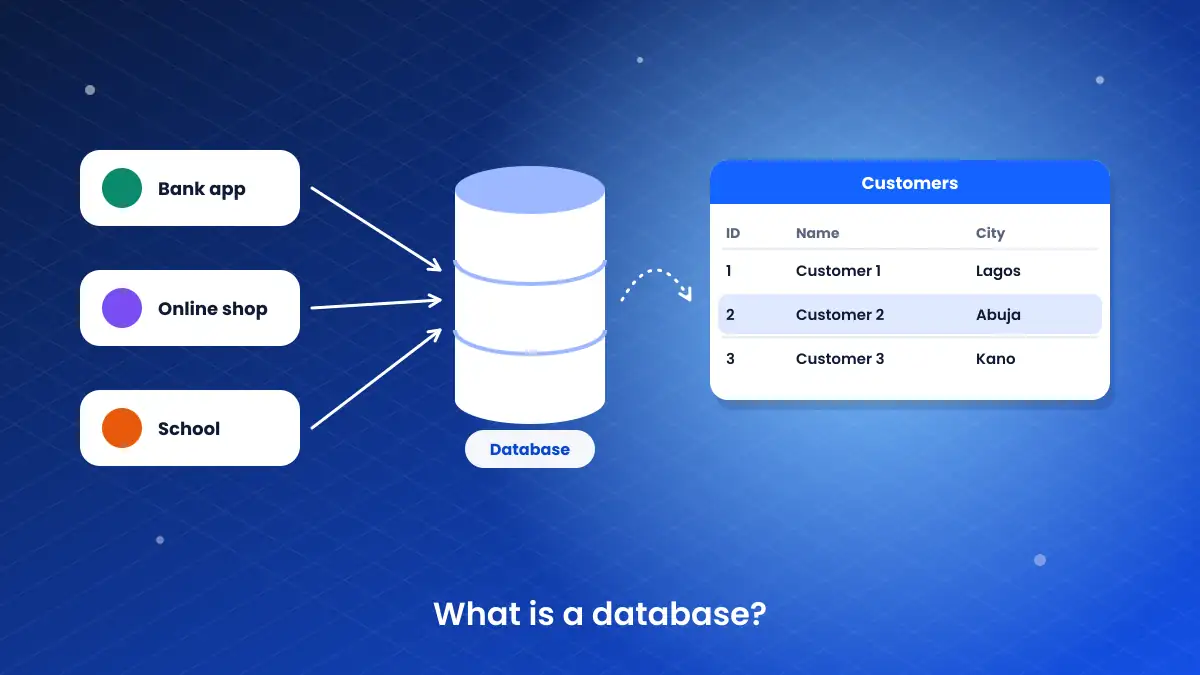
- Everyday examples of databases
- What is SQL?
- Does a small business need a database?
- How to keep a database safe
- Frequently asked questions
- Key takeaways on what is a database
What is a database?
A database is a structured store of information that a computer can search and update quickly. Instead of loose notes or scattered files, the data sits in an organised way, so you can ask for exactly what you need.
For example, a shop’s database might hold every customer, product and order. With it, the owner can answer questions such as “Which customers bought shoes last month?” in seconds.
Strictly speaking, the data and the software that manages it are two different things. The data is the database itself. The software is the database management system, or DBMS. However, people often use the word “database” for both.
How a database works
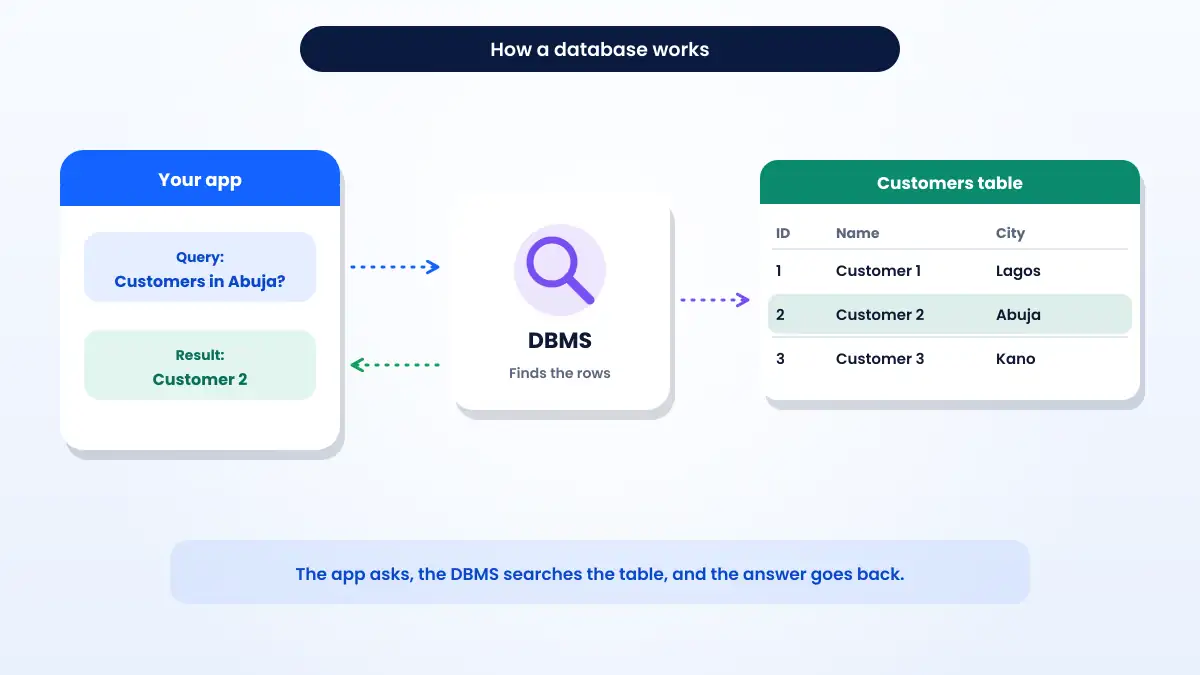
Here is what happens when an app uses a database:
- You add data. First, when you sign up for an app, it saves your name, email, and other details as a new record.
- The DBMS organises it. Next, it stores each record in the right place, usually in a table, so the app can find it again quickly.
- An app asks a question. For instance, a banking app asks, “What is the balance on this account?” This request is called a query.
- The DBMS finds the answer. Then it searches the data, often using an index, which works like the index at the back of a book.
- The result goes back. Finally, the app receives the answer and shows it on your screen.
- The DBMS records changes safely. For example, when money moves, the DBMS updates both accounts together, so the records stay correct even if something fails halfway.
In addition, apps often connect to their data through an API. Our guide to what an API is explains how that connection works.
Here are the main terms you will see:
| Term | What it means |
|---|---|
| Table | A set of related data, such as all customers |
| Row (record) | One item in a table, such as one customer |
| Column (field) | One type of detail, such as phone number |
| Primary key | A unique ID for each row, such as a customer number |
| Query | A question or instruction sent to the database |
| DBMS | The software that stores, finds, and protects the data |
Database vs spreadsheet: what is the difference?
At first, a spreadsheet looks similar, because it also stores data in rows and columns. However, they are built for different jobs.
| Feature | Spreadsheet | Database |
|---|---|---|
| Best for | Small lists, budgets, and quick sums | Large amounts of connected data |
| Size | Slows down with very large files | Handles millions of records |
| Users | Usually a few people at a time | Many users and apps at once |
| Rules | Easy to type anything anywhere | Can enforce rules, such as “price must be a number” |
| Links between data | Hard to connect sheets reliably | Tables are linked with keys |
| Example | A monthly expenses sheet | A bank’s customer and transaction records |
For a small business, a spreadsheet is often the right place to start. Our guide on how to track business expenses in Excel shows a simple setup. Once you have many customers, orders, or staff working on the same data, a database becomes the better choice. However, when several organisations must share one record that none of them controls, some use a blockchain instead.
Types of databases
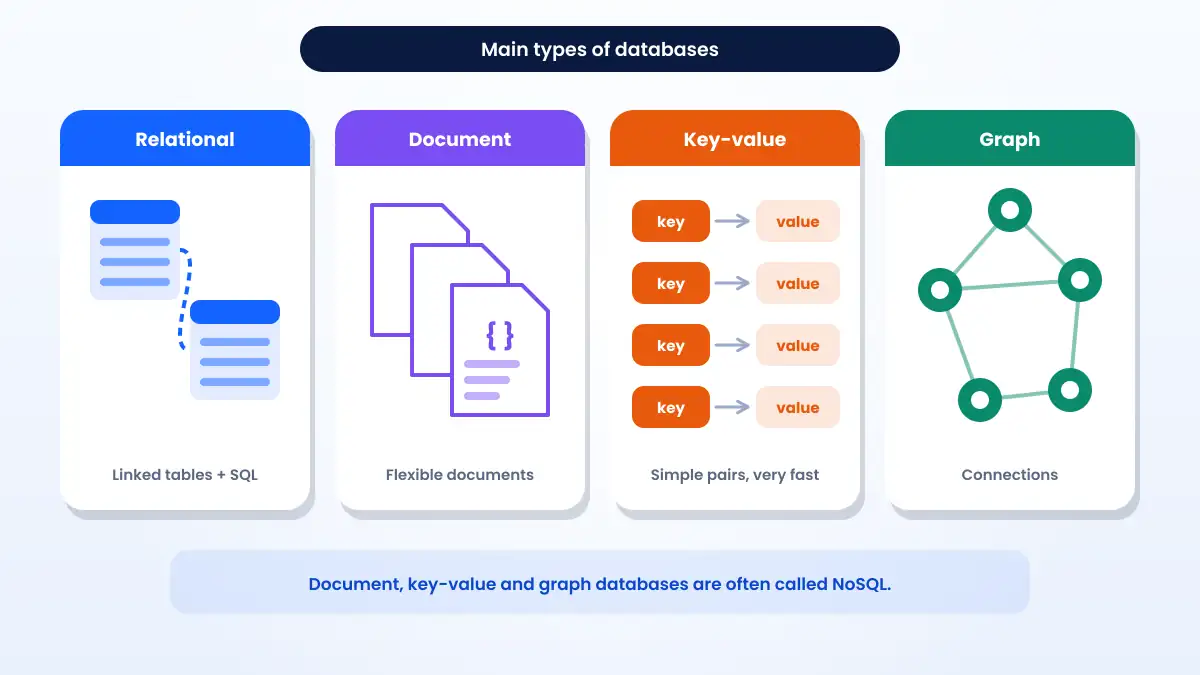
In fact, there are several types. The main ones are:
- Relational databases. These store data in linked tables. Edgar F. Codd proposed this model at IBM in 1970, and it is still the most common type. Most relational databases use SQL. Examples include PostgreSQL, MySQL, Microsoft SQL Server, Oracle Database, and SQLite.
- Document databases. These store each item as a flexible document, often in a format similar to JSON. For example, MongoDB is a well-known one.
- Key-value databases. These store simple pairs, such as a session ID and its details. Because they are very fast, apps often use them for temporary data. Redis is a popular example.
- Graph databases. These focus on connections, such as who follows whom. As a result, they suit social networks and fraud checks.
- Cloud databases. These run on a cloud provider’s servers instead of your own machines. Our guide to what cloud computing is explains the idea.
Document, key-value and graph databases are often grouped together as NoSQL databases, because they do not rely only on tables and SQL.
Which ones do developers actually use? In the 2025 Stack Overflow Developer Survey, as reported by I Programmer, 55.6% of respondents to the database question said they had used PostgreSQL extensively, making it the most used database in the survey.
Everyday examples of databases
You rely on them many times a day, often without noticing:
- Banking. Your bank keeps every account, balance, and transaction in one.
- Online shopping. A store’s database holds products, prices, stock levels and orders.
- Your phone. Your contacts, messages and app settings usually live in small data stores on the device itself.
- Schools. Most schools track student records, results and fees this way.
- Hospitals. Similarly, hospitals keep patient records and appointments in shared record systems.
- Websites. A WordPress website keeps its posts, pages and users in a MySQL or MariaDB database.
What is SQL?
SQL, short for Structured Query Language, is the standard language for working with relational databases. In other words, it lets you add, find, change, and delete data.
For example, a shop owner who wants the names of all customers in Lagos could run a query such as “SELECT name FROM customers WHERE city = ‘Lagos’“. The database then returns a list of matching names.
You do not need to learn SQL to use most apps, because the app writes the queries for you. Still, basic SQL is a useful skill for anyone working with data.
Does a small business need a database?
In many cases, you already use one. Accounting apps, customer relationship management (CRM) tools, online store builders, and booking systems all store your records this way behind the scenes. Our list of free business tools includes several that do this for you.
As a rule of thumb, consider a proper database, or an app built on one, when:
- several people need to update the same records at once
- your spreadsheet has become slow or full of mistakes
- you need to link customers, orders, and payments together
- you want your website or app to save data automatically
How to keep a database safe
A database often holds your most valuable information, so protect it well:
- Back it up regularly. Keep copies in a separate place, and also test that you can restore them.
- Limit access. Give each person only the access they need, and also remove old accounts quickly.
- Use strong passwords and two-factor authentication on database, hosting, and app accounts.
- Keep software updated. This matters because updates fix security holes that attackers look for.
- Encrypt sensitive data, especially customer details and payment information.
- Collect only what you need. After all, less data means less risk if something goes wrong.
In Nigeria, the Nigeria Data Protection Act, 2023, signed in June 2023, requires organisations to keep personal data secure and to collect only what is necessary. For more account safety tips, see our guide on how to protect your bank account online.
Frequently asked questions
Is Excel a database?
Not really. Excel is a spreadsheet. It can store lists of data, but it lacks many database features, such as strict rules, safe multi-user editing, and reliable links between tables.
What is the difference between a database and a DBMS?
The database is the stored data. The DBMS is the software that manages it, such as MySQL or PostgreSQL. In everyday speech, people often use “database” for both.
Is SQL a database?
No. SQL is a language used to talk to relational databases. MySQL, PostgreSQL, and SQL Server are database systems that understand SQL.
What is the most popular database?
In the 2025 Stack Overflow Developer Survey, PostgreSQL was the most used database among respondents. MySQL, SQLite, SQL Server, MongoDB, and Redis are also widely used.
Where is a database stored?
It sits on a computer, such as a server in a data centre, a cloud provider’s servers, or even your own phone.
Key takeaways on what a database is
- A database is an organised collection of data that a computer can search and update quickly.
- A DBMS is the software that stores, finds, and protects that data.
- Relational databases use linked tables and SQL, while NoSQL databases use documents, key-value pairs or graphs.
- Spreadsheets suit small lists, but databases handle large, shared, and connected data far better.
- Back up your data, limit access, and follow data protection rules.
Want simpler explanations? Browse all our Digital Explained guides, or learn what a webhook is.