You use the cloud every day, even if you have never called it that. Your emails, WhatsApp backups, Google Drive files, and the films you stream all live on computers far away from you. So, what is cloud computing, and why does it matter? This beginner’s guide explains it in plain English, with real-world examples, the main types of cloud services, and the benefits and risks you should know.
Quick answer: Cloud computing means using computing services, such as storage, software, databases, and processing power, over the internet instead of on your own device or server. A cloud provider owns and runs the hardware in large data centres, and you pay only for what you use, or use a free plan. Everyday examples include Gmail, Google Drive, iCloud, Netflix and online banking apps. The three main types are Software as a Service (SaaS), Platform as a Service (PaaS) and Infrastructure as a Service (IaaS).
In this guide
- What is cloud computing?
- How cloud computing works
- Real-world examples of cloud computing
- Types of cloud services: SaaS, PaaS and IaaS
- Public, private and hybrid cloud
- Benefits of cloud computing
- Risks and limits of cloud computing
- Cloud computing in Nigeria
- How to use the cloud safely
- Frequently asked questions
- Key takeaways on what is cloud computing
What is cloud computing?
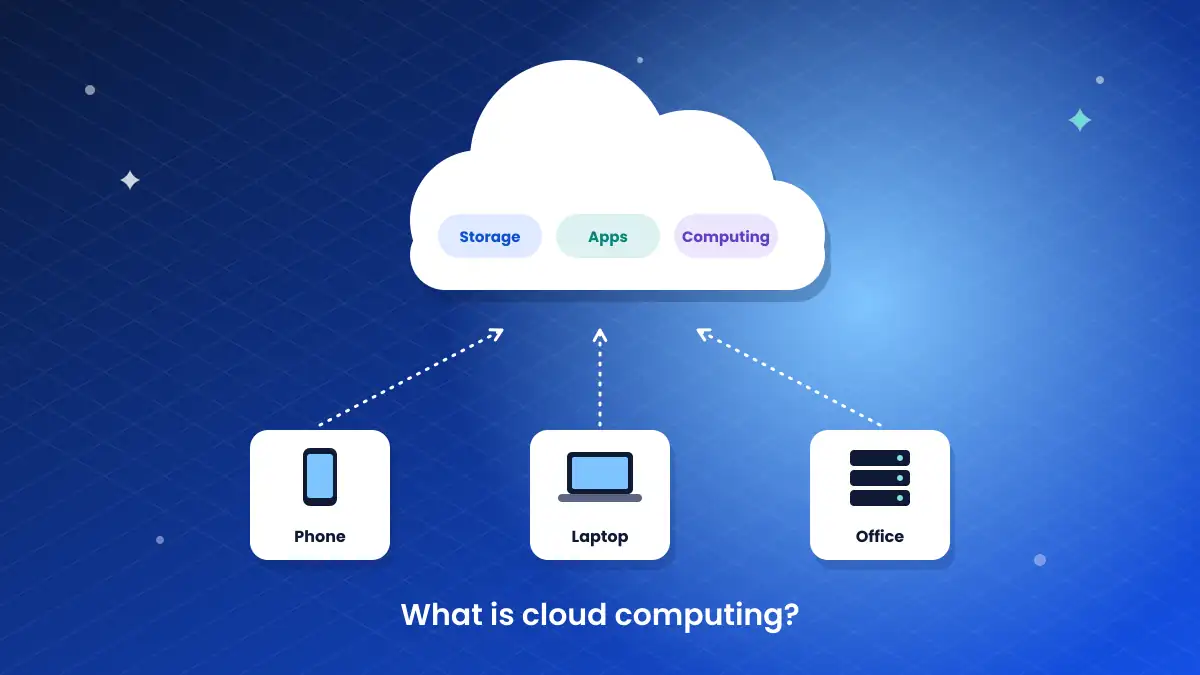
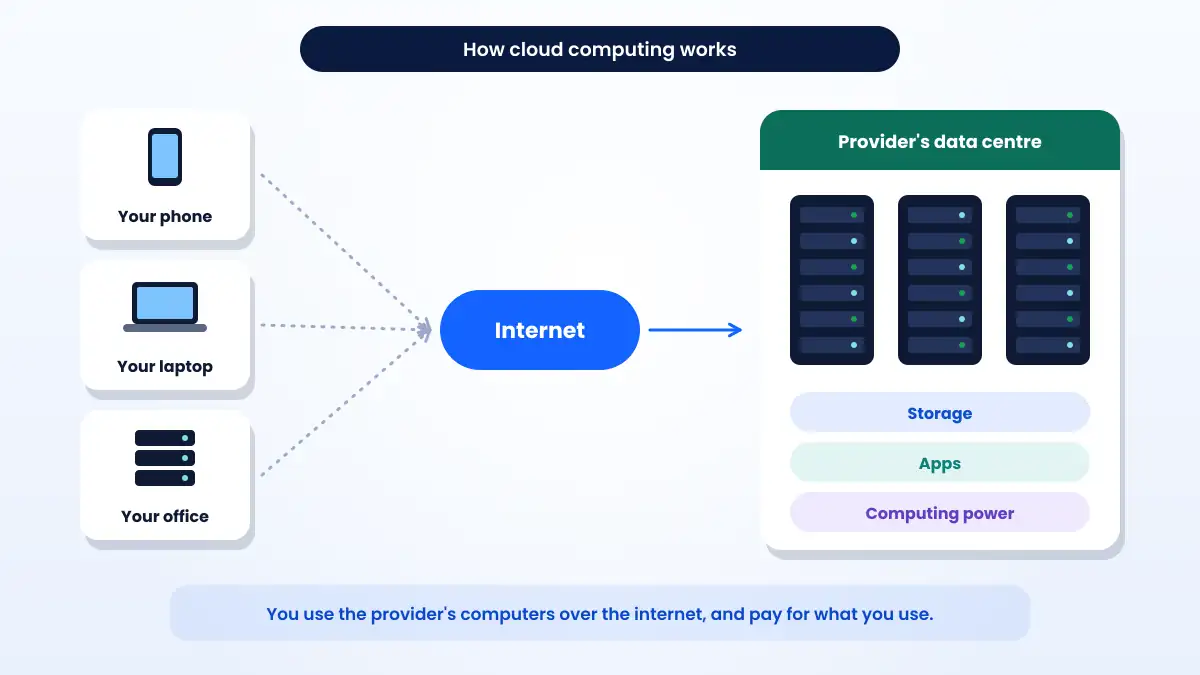
Cloud computing is a way of renting computing power over the internet. Instead of buying a powerful computer or server and keeping it in your office, you use one that a provider runs for you. Then you reach it through a browser or an app.
The US National Institute of Standards and Technology (NIST) gives the standard definition. In its definition of cloud computing, NIST calls it on-demand network access to a shared pool of computing resources that can be set up and released quickly, with little effort from the provider.
In other words, the “cloud” is just other people’s computers, connected to the internet and managed for you.
How cloud computing works
First, cloud providers build huge data centres full of servers, storage drives and network equipment. Then they split that hardware into smaller pieces and rent them out to many customers at once.
When you save a photo to the cloud, for example, this happens:
- Your phone sends the photo over the internet to the provider.
- The provider stores it on servers in a data centre, often with extra copies in other places. Much of that information is kept in a database, so apps can find it quickly.
- You open it later from any device by signing in to your account.
NIST lists five features that make a service “cloud”:
- On-demand self-service. You can sign up and get resources without calling anyone.
- Broad network access. You reach the service over the internet from phones, laptops, and other devices.
- Resource pooling. Many customers share the same hardware safely.
- Rapid elasticity. You can add or remove capacity quickly as your needs change.
- Measured service. The provider tracks your usage, so you pay only for what you use.
Real-world examples of cloud computing
In fact, you probably use several cloud services already. Here are some common ones:
| Example | What happens in the cloud |
|---|---|
| Gmail and Outlook | Your emails are stored on the provider’s servers, not on your phone |
| Google Drive, OneDrive and iCloud | Your files and photos are saved online, so you can open them anywhere |
| WhatsApp chat backups | Your chats are backed up to Google Drive or iCloud |
| Netflix, YouTube and Spotify | Films and music stream from data centres to your screen |
| Online banking apps | Your bank runs its systems on servers, often in the cloud |
| AI chat tools | Large AI models run on cloud servers, not on your phone |
| Online stores and websites | Shops and blogs run on rented web hosting |
For example, our guide on how to transfer files from phone to computer shows how cloud storage lets you move files without a cable. Similarly, our guide on how to back up your phone uses free cloud storage to protect your photos and contacts. Once your photos are in the cloud, you can also free up phone storage on your device.
Types of cloud services: SaaS, PaaS and IaaS
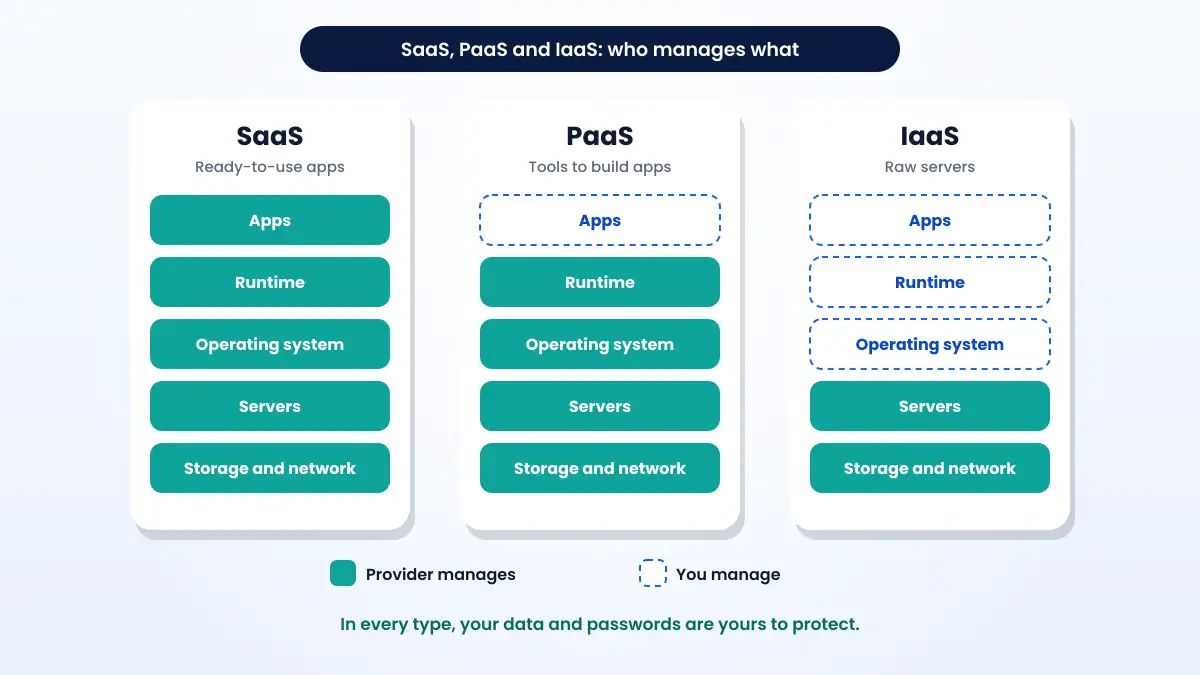
Cloud services come in three main types. The difference is how much the provider manages for you.
| Type | What you get | Examples | Who uses it |
|---|---|---|---|
| Software as a Service (SaaS) | Ready-to-use software in your browser or app | Gmail, Microsoft 365, Canva | Everyone |
| Platform as a Service (PaaS) | Tools to build and run apps without managing servers | Google App Engine, Heroku | Developers |
| Infrastructure as a Service (IaaS) | Raw servers, storage, and networks you control | Amazon EC2, Microsoft Azure virtual machines | IT teams |
In practice, most people only ever use SaaS. Businesses that build their own apps or websites may also use PaaS or IaaS. Many of these services connect to each other through APIs, as our guide to what an API is explains.
Public, private and hybrid cloud
Cloud services also differ by who shares the hardware, for example:
- Public cloud. Anyone can sign up, and many customers share the provider’s hardware. Amazon Web Services (AWS), Microsoft Azure and Google Cloud are the biggest examples.
- Private cloud. One organisation uses the hardware alone, for example, a bank that needs tight control over its data.
- Hybrid cloud. A mix of both, where some systems stay private, and others use the public cloud.
NIST also describes a community cloud, which a group of organisations with shared needs uses together.
Meanwhile, the public cloud market is large and growing. According to Synergy Research data reported by CRN Asia, businesses spent $129 billion on cloud infrastructure services in the first quarter of 2026. AWS held 28% of the market, Microsoft 21%, and Google 14%.
Benefits of cloud computing
Overall, cloud computing is popular for good reasons:
- Lower upfront cost. You do not need to buy expensive servers. Instead, you pay monthly or use a free plan.
- Access from anywhere. Your files and apps follow you to any device with internet access. The same cloud services also power smart devices, as our guide to what the internet of things is explains.
- Automatic backups. Many services keep copies of your data, so a lost phone does not mean lost files.
- Easy to grow. A business can add storage or users in minutes as it grows.
- Less maintenance. The provider handles hardware, updates, and much of the security.
- Easy sharing. Teams can work on the same document at the same time.
Risks and limits of cloud computing
However, the cloud is not perfect. Keep these limits in mind:
- You need internet access. Without data or Wi-Fi, you may not reach your files unless you saved them offline.
- Outages happen. When a large provider has a problem, many apps can stop working at once.
- Privacy and control. Your data sits on someone else’s servers, so read the privacy terms and choose trusted providers.
- Account security. If someone steals your password, they may get all your files. Our guide on how to secure your Gmail account shows how to lock down a key cloud account.
- Costs can grow. Free plans have limits, and paid storage or business services add up over time.
In short, the provider secures its data centres, but you are responsible for your own passwords, settings, and what you share.
Cloud computing in Nigeria
Cloud services are growing in Nigeria too. For example, AWS opened a Local Zone in Lagos in January 2023, as Nairametrics reported. A Local Zone puts cloud computing, storage, and database services closer to users in the city. As a result, apps can respond faster, and regulated businesses such as banks can keep some data within the area.
For small businesses, in particular, the cloud makes many tools affordable. For instance, you can run email, documents, accounting sheets, and a website without owning a single server. Our list of the best free business tools includes several cloud apps with free plans.
How to use the cloud safely
To stay safe, follow these simple habits:
- Turn on two-step verification for your email and cloud storage accounts.
- Use a strong, unique password for each account.
- Back up important files to the cloud, and keep a second copy offline if they are critical.
- Check sharing settings before you send a link to a file.
- Avoid storing passwords or PINs in plain documents in the cloud.
- Review free storage limits, so your backups do not stop without warning.
Frequently asked questions
Is cloud computing the same as the internet?
No. The internet is the network that connects computers. Cloud computing is a service that runs on that network, such as storage or software you access online.
Is it safe to store files in the cloud?
Generally, yes, if you use a trusted provider and protect your account. Most data losses come from weak passwords or phishing, not from the provider’s data centre.
Do I need to pay for cloud computing?
Not always. For example, many services, such as Gmail, Google Drive and iCloud, have free plans with limited storage. You pay only if you need more space or business features.
What is the difference between cloud storage and cloud computing?
Cloud storage is one type of cloud computing. However, cloud computing also covers software, databases, processing power, and AI tools.
Who are the biggest cloud providers?
Currently, Amazon Web Services, Microsoft Azure and Google Cloud are the largest public cloud providers by market share.
Key takeaways on what cloud computing is
- Cloud computing means using storage, software, and computing power over the internet.
- A provider runs the hardware in data centres, and you pay only for what you use.
- The three service types are SaaS, PaaS and IaaS.
- Clouds can be public, private, hybrid, or community.
- The cloud saves money and adds flexibility, but you must protect your accounts.
Want to learn more tech basics? Browse all our Digital Explained guides, or see how AI tools for small businesses use the cloud.