You do not need money to study with AI. Today, several free AI tools for students can explain a hard topic, quiz you on your lecture notes, check your maths, and polish your English. Even better, some work inside WhatsApp, so they suit a small data budget. This guide compares the best free AI tools for students in Nigeria in 2026, shows what each free plan really includes, and explains how to claim Google’s free year of AI Plus. It also covers how to use AI without breaking your school’s rules.
Quick answer: The best free AI tools for students in Nigeria are Google Gemini (free, or free AI Plus for a year if you are a verified student aged 18+), ChatGPT with study mode, Gemini Notebook (formerly NotebookLM) for revising your own notes, Meta AI inside WhatsApp, Microsoft Copilot, Perplexity, Photomath or Google Lens for maths, Claude, Grammarly and Canva. Use them to understand and practise, not to write work you submit as your own.
In this guide
- Why free AI tools for students matter in Nigeria
- The best free AI tools for students at a glance
- The best free AI tools for students, one by one
- How to claim Google’s free AI Plus student plan
- How to use free AI tools for students without cheating
- Example: a week of exam prep with free AI tools for students
- Save data and stay safe with free AI tools for students
- Frequently asked questions
- Key takeaways on free AI tools for students
Why free AI tools for students matter in Nigeria
Nigerian students face real limits. Classes are large, so lecturers have little time for one-on-one help. Also, private tutors cost money, and data is expensive. Free AI tools for students help close that gap, because they give you a patient tutor at any hour. Lecturers and teachers can use similar tools too, as our guide to AI tools for teachers shows.
However, the tools are not magic. They make mistakes, they need data, and misuse can get you into trouble with your school. So the goal is simple: pick the right tool for each task, then use it in a way that makes you learn faster.
The best free AI tools for students at a glance
| Tool | Best for | Free plan in brief |
|---|---|---|
| Google Gemini | Explanations, research, guided learning | Free with a Google account; verified students 18+ can get AI Plus free for 12 months |
| ChatGPT | Step-by-step tutoring with study mode | Free plan with everyday chat, plus smaller allowances for uploads and images |
| Gemini Notebook (formerly NotebookLM) | Revising from your own slides and PDFs | Free, with up to 50 sources per notebook, quizzes and flashcards |
| Meta AI on WhatsApp | Quick questions on low data | Free, since it runs inside WhatsApp, Instagram, Facebook, and Messenger |
| Microsoft Copilot | Answers with web sources | Also free with a Microsoft account |
| Perplexity | Research with citations | Free, but with a limit on its advanced searches |
| Photomath and Google Lens | Checking maths working | Free step-by-step solutions; extra explanations cost money |
| Claude | Reading long documents and feedback on essays | Free plan, but with daily usage limits |
| Grammarly | Grammar and clarity | Free basic checks, although advanced suggestions cost money |
| Canva | Slides, posters and project visuals | Free plan with a small AI allowance |
Free limits change often, so treat the “free plan” column for these free AI tools for students as a guide. Also, check each tool’s own page before you rely on a feature for an exam week.
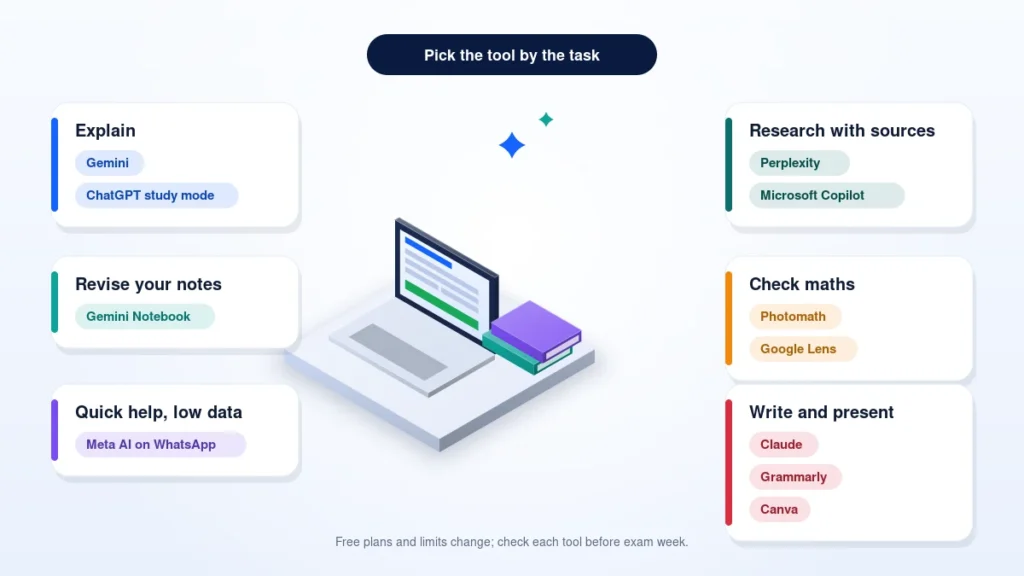
The best free AI tools for students, one by one
1. Google Gemini: the best all-round pick among free AI tools for students
Gemini is Google’s AI assistant, and the free version already handles most study tasks. For example, you can ask it to explain a topic at three levels, or to set ten practice questions on it. Its Guided Learning mode asks you questions instead of handing over answers. That makes it a good fit for revision.
The bigger news is the student offer. In August 2026, Google said verified students in Nigeria can get Google AI Plus free for 12 months. Daily Trust put its value at ₦92,400 per student. It adds higher limits, Deep Research, unlimited file uploads, and 400 GB of storage. We explain how to claim it below.
2. ChatGPT: free tutoring with study mode
ChatGPT’s free plan gives you everyday chat with OpenAI’s current model, with smaller allowances for file uploads, images, and deep research. For students, the key feature is study mode. OpenAI launched it in July 2025 for free users too. Instead of solving the problem for you, it breaks the topic into steps, asks questions, and checks your understanding. It can also help with spreadsheets, as our guide to ChatGPT for Excel analysis shows.
So, use study mode when a topic does not make sense in class. Then ask it to quiz you until you get five questions right in a row.
3. Gemini Notebook (formerly NotebookLM): revise from your own notes
Google renamed NotebookLM to Gemini Notebook in July 2026. It is still one of the most useful free AI tools for students, because it answers only from the sources you upload. Add your lecture slides, PDFs, or handouts, and it can build summaries, flashcards, quizzes, mind maps, and even an audio overview you can listen to on the bus.
Its free plan allows up to 100 notebooks and 50 sources in each one. Because it sticks to your material, it is less likely to wander off your syllabus.
4. Meta AI on WhatsApp: quick help on a small data budget
Meta AI sits inside WhatsApp, Instagram, Facebook, and Messenger, and it has been available in Nigeria since 2024. Simply open the Meta AI chat in WhatsApp and type your question. In fact, for a quick definition or a short explanation, it is the lightest option, because you are already in the app.
However, keep it to simple questions. For long tasks or anything you will quote, move to a tool that shows its sources.
5. Microsoft Copilot: answers with sources
Copilot is free with a Microsoft account, and it searches the web as it answers. Then it lists the links it used. That makes it handy when you need a quick, sourced overview before you read further. Also, if your school gives you a Microsoft 365 account, check whether it includes extra Copilot features.
6. Perplexity: research with citations
Perplexity works like a search engine that writes a short answer and cites every claim. As a result, it is a good starting point for an assignment, because you can click straight through to the sources. The free plan limits its advanced searches, but its basic searches cover most student needs.
7. Photomath and Google Lens: check your maths working
Point your camera at a maths problem, and Photomath shows a step-by-step solution. Google, which owns Photomath, also offers homework help in Google Lens. Use these tools to check your working after you try a question, not before. Otherwise, you will recognise the steps but fail to produce them in the exam hall. For students in Nigeria, you can check mathplug.com built to help secondary school students. For a full method, read our guide on how to use AI to learn mathematics.
8. Claude: long documents and essay feedback
Claude, from Anthropic, has a free plan with daily limits. It reads long documents well. So, it suits jobs such as summarising a long journal article or giving feedback on the structure of your essay draft. Ask it what is unclear in your argument, rather than asking it to rewrite the essay. Our guide on how to summarise documents with AI shows how to check a summary against the original.
9. Grammarly: cleaner English
Grammarly’s free version fixes spelling, grammar, and punctuation as you type, on the web and on your phone keyboard. For students who write in English as a second or third language, it catches common slips. Still, read each suggestion before you accept it, because it does not always understand Nigerian names or local terms. To compare Grammarly with QuillBot, LanguageTool and other free checkers, see our guide to the best free AI writing tools. When you apply for jobs, our guide on how to create a CV with AI shows the full process.
10. Canva: presentations and project visuals
Canva’s free plan gives you thousands of templates for slides, posters and charts, plus a small allowance of its AI design tools. For group presentations, it is often faster than starting from a blank slide. For the full process, from outline to rehearsal, see our guide on how to create presentations with AI.
How to claim Google’s free AI Plus student plan
Google’s offer is the most valuable of the free AI tools for students right now, so it is worth claiming correctly. Based on the step-by-step guide published by WithinNigeria, the steps are:
- Check that you qualify: you must be 18 or older and currently enrolled at an accredited Nigerian university, polytechnic, or college of education.
- Go to Google’s official student page, gemini.google/students, on your phone or computer, and make sure it shows the Nigeria version of the offer.
- Sign in with the Google account you want the plan on.
- Verify your student status through SheerID, Google’s verification partner. Select your school and enter your details.
- Upload proof if asked, such as your school email, a clear photo of your student ID, or your current course registration.
- After approval, accept the terms and activate the 12-month plan.
If you claimed Google’s 2025 student offer, you may be able to renew for another year by verifying again. Also, read the terms before you accept: if the page asks for a card, the plan may renew as a paid plan after 12 months unless you cancel, so set a reminder.
Be careful, though. Google does not charge for this offer, and nobody needs your password to “activate” it for you. So, ignore WhatsApp messages that sell access or ask for a fee.
How to use free AI tools for students without cheating
AI can make you a stronger student or a weaker one. The difference lies in how you use it.
- Read your school’s rules first. Many lecturers now state what AI use they allow. When in doubt, ask.
- Use AI to understand, not to submit. Ask for explanations, examples, and practice questions. Then write your own answers.
- Check every fact. AI tools can invent quotes, figures, and references. So, confirm anything important in your textbook or a source you can name.
- Never paste exam questions during a test. It is misconduct, and it can lead to serious penalties.
- Say when you used AI. If your lecturer allows AI help, note how you used it, just as you would cite a book.
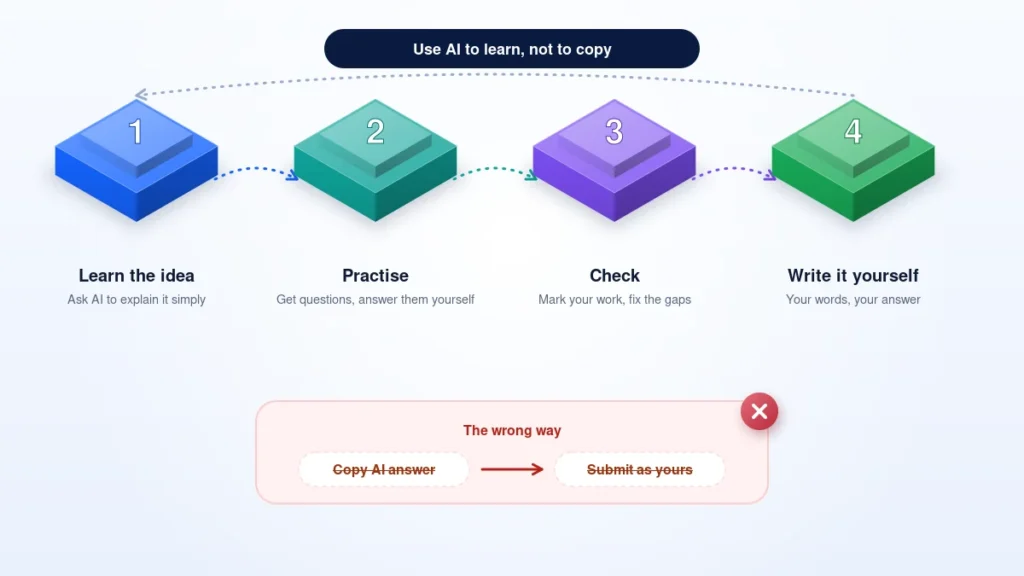
Example: a week of exam prep with free AI tools for students
For example, imagine Ada, a 200-level student with a statistics exam in seven days. Here is how she could use free AI tools for students without spending money:
- Day 1: First, she uploads her lecture slides and past questions into Gemini Notebook. Then she asks for a one-page summary of each topic.
- Days 2 to 4: Next, she works through the hardest topic, hypothesis testing, in ChatGPT’s study mode until she can explain it back.
- Day 5: Then she solves past questions on paper and uses Photomath to check her working.
- Day 6: After that, she asks Gemini Notebook for a 20-question quiz and reviews every wrong answer.
- Day 7: Finally, she uses Meta AI on WhatsApp for quick definitions while she revises, which keeps her data use low.
Notice that, at every step, the free AI tools for students explain or test. Ada still thinks, so she can perform in an exam hall with no phone.
Save data and stay safe with free AI tools for students
Free AI tools for students still cost data, and they still see what you type. So, follow a few habits:
- Type instead of talking. Voice and video features use far more data than text.
- Use Wi-Fi for big files. Upload big PDFs on campus Wi-Fi where you can, instead of on mobile data.
- Keep personal details out. Do not paste your BVN, NIN, bank details, or passwords into any AI chat.
- Use official apps only. Fake “AI” apps and links that promise free premium plans often steal accounts. Instead, download apps from the Play Store or App Store, and check the developer’s name.
- Secure your accounts. Turn on two-step verification on your Google and Microsoft accounts, because your notes and uploads live there.
Frequently asked questions
Are these free AI tools for students really free?
Yes. Each of these free AI tools for students has a free plan you can use without a card. However, free plans have limits, and some features need a paid plan.
Which of the free AI tools for students is best?
For most students, Gemini is the best all-round choice, especially if you qualify for the free AI Plus year. For revising your own notes, Gemini Notebook is hard to beat.
Can secondary school students use these tools?
In most cases, yes, because most tools accept users from age 13. However, users under 18 often need a parent’s permission, and Google’s free AI Plus offer is only for tertiary students aged 18 and above.
Will my lecturer know I used AI?
Lecturers often notice AI-written work, and some schools use detection tools. More importantly, copying AI answers leaves you unprepared for exams. So, use AI to learn, and write your own work.
Which free AI tools for students use the least data?
Of all the free AI tools for students, Meta AI inside WhatsApp is usually the lightest, because it runs in an app you already use. Text chats in any tool use far less data than voice or image features.
Can free AI tools for students help with JAMB or WAEC?
Yes. Ask Gemini or ChatGPT to set practice questions on a topic in the syllabus, then mark your answers. Still, always confirm facts with your approved textbooks.
Key takeaways on free AI tools for students
- Gemini, ChatGPT study mode, and Gemini Notebook cover most study needs for free.
- Verified students aged 18+ in Nigeria can claim Google AI Plus free for 12 months through gemini.google/students.
- Meta AI in WhatsApp is the lightest option for quick questions.
- Use Photomath or Google Lens to check maths, not to skip the working.
- Also, follow your school’s AI rules, check every fact, and never paste personal details.
Want more practical guides? See the best free AI tools for small businesses, browse our AI and productivity guides, or see all our latest articles.