Your phone number is the key to most of your money. Your bank sends one-time passwords (OTPs) and alerts to it, and many apps use it to reset your password. SIM swap fraud turns that key against you. A criminal convinces your mobile network to move your number to a SIM card they hold. Then every code meant for you goes to them. This guide explains how SIM swap fraud works, the warning signs, what to do in the first hour, and how to protect yourself.
Quick answer: SIM swap fraud happens when a criminal gets your phone number moved to a new SIM card that they control. They usually trick or bribe staff at a mobile network, often with stolen personal details. Once the swap goes through, your phone loses signal, and the criminal receives your calls, texts, and OTPs. They then reset your banking or email passwords and move your money. If your line suddenly goes dead, act at once: call your network from another phone and block your bank account.
In this guide
- What is SIM swap fraud?
- How SIM swap fraud works, step by step
- Why your phone number is the target
- How fraudsters get a SIM swap done
- An example of SIM swap fraud
- Warning signs of SIM swap fraud
- What to do if you are a victim
- How to protect yourself from SIM swap fraud
- What banks and networks are doing about SIM swap fraud
- Frequently asked questions
- Key takeaways
What is SIM swap fraud?
A SIM swap is a normal service. When you lose your phone or damage your SIM, your network gives you a new SIM with the same number. In Nigeria, the Nigerian Communications Commission (NCC) requires a verified National Identification Number (NIN) before a network can replace a SIM, according to its SIM replacement policy.
SIM swap fraud is the same process, done for the wrong person. The criminal pretends to be you, or pays someone inside the network, so that your number moves to their SIM. Your old SIM stops working at that moment. As a result, the criminal now receives everything sent to your number. Some fraudsters go further and use AI to copy a real person’s voice, as our guide to deepfake scams shows.
This is not hacking your phone. Your handset is fine. Instead, the attack targets the network’s record of which SIM owns your number.
How SIM swap fraud works, step by step
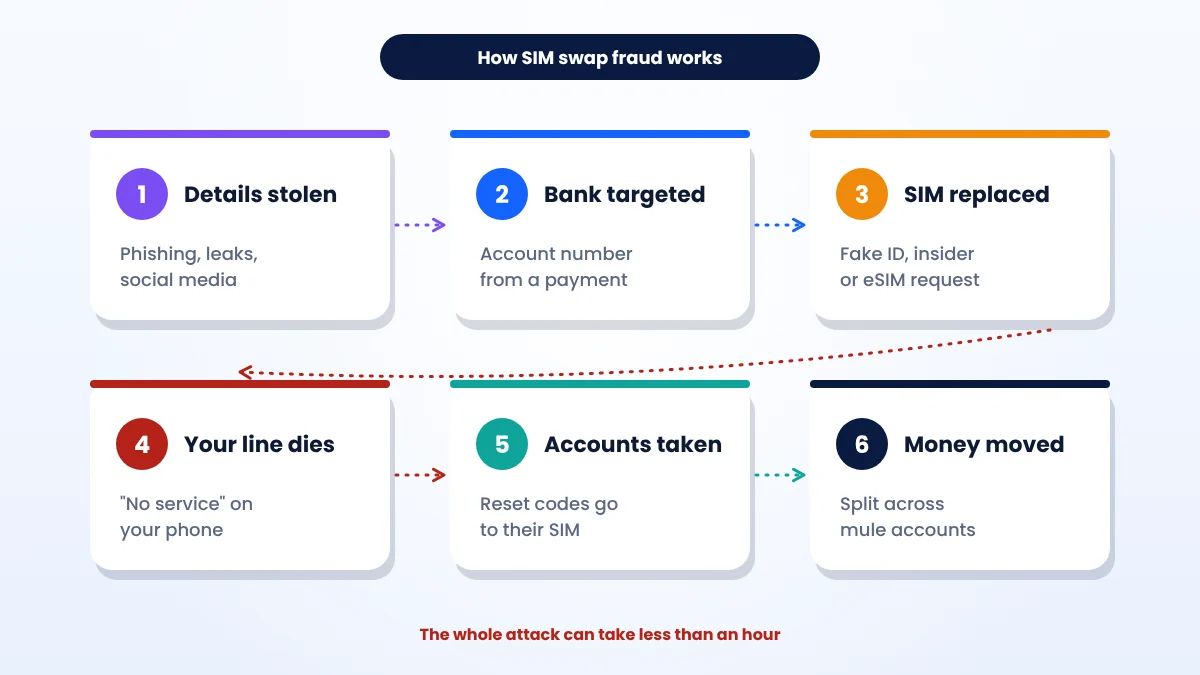
Most SIM swap fraud follows the same pattern:
- The criminal collects your details. They gather your name, phone number, date of birth, and sometimes your NIN or BVN. Usually, these come from phishing messages, data leaks, social media, or a stolen ID card.
- They target your bank account. Often they first get your account number from a payment you made, or they guess your bank from a debit alert you showed someone.
- They request a SIM replacement. Next, they visit a network shop or agent and claim your SIM was lost. Some use a fake ID or a bribed insider. Others ask for an eSIM, which is a digital SIM set up with a QR code. Our guide explains what an eSIM is and how to get one safely.
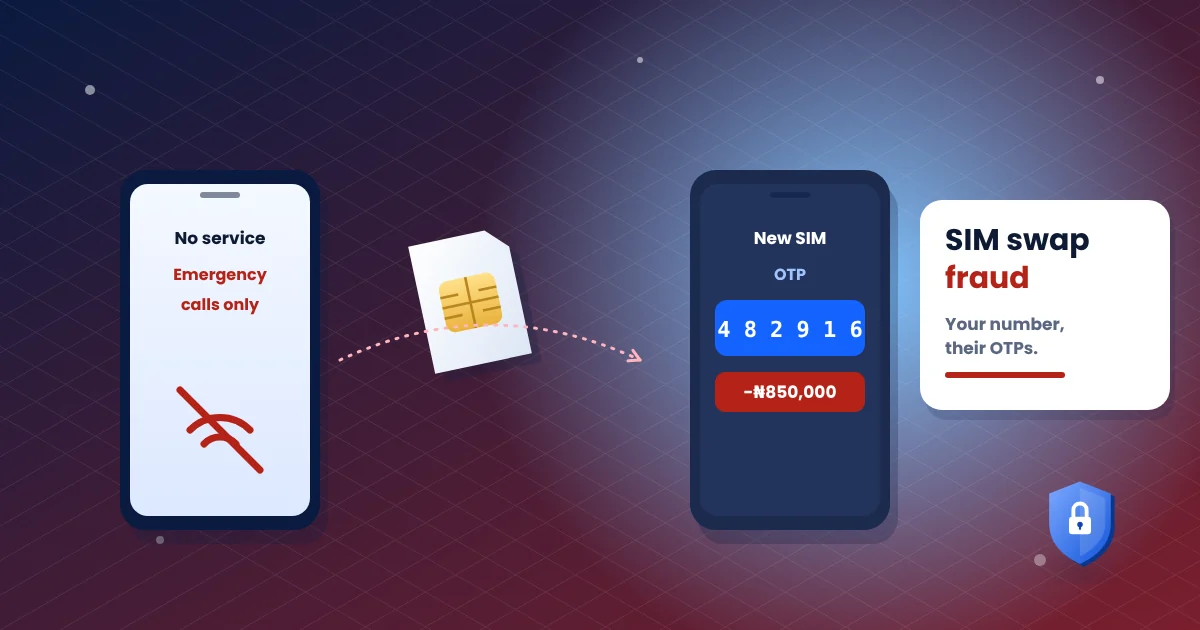
- Your number moves to their SIM. Your phone suddenly shows no signal or “Emergency calls only”. Meanwhile, their SIM receives your calls and texts.
- They take over your accounts. Then they use “forgot password” on your banking app, email, or wallet. The reset codes arrive on their SIM, so they get in.
- They move the money fast. Finally, they transfer funds to mule accounts, buy airtime or gift cards, and split the money across many accounts within minutes.
The whole attack can take less than an hour. That is why speed matters more than anything once you notice the signs.
Why your phone number is the target
In Nigeria, your phone number does more than receive calls. Your bank links it to your BVN, sends OTPs to it, and uses it for USSD banking. In addition, email providers and social media apps use it to confirm that you are you. Our guide to what a BVN is explains how your bank ties your identity to that number.
So, whoever controls your number can often pass these checks:
| What the number controls | What a criminal can do with it |
|---|---|
| OTPs for transfers and card payments | Approve transfers and online card payments |
| Password reset codes | Take over your banking app, email, or social media |
| Bank alerts | Hide the theft, because the alerts go to their SIM |
| USSD banking on the SIM | Start transfers if they also know or reset your PIN |
| Calls from your bank | Answer the bank’s security call as if they were you |
Notice that the criminal still needs something else, such as your PIN, password, or card details. In practice, they often get those first through a phishing message. Then the SIM swap gives them the final piece: the OTP. That is why our guide to what two-factor authentication is recommends an authenticator app over SMS codes. Your WhatsApp is tied to your number too, so learn how to secure your WhatsApp account.
How fraudsters get a SIM swap done
The FBI’s public warning on SIM swapping lists three main methods. All three are seen in Nigeria too:
| Method | How it works | What protects you |
|---|---|---|
| Social engineering | The criminal pretends to be you at a shop, agent, or call centre | Strict NIN checks; keep your details private |
| Insider help | A network staff member or agent is bribed to swap the SIM | Network controls and audits; bank alerts by email too |
| Phishing staff | Network staff are tricked into installing malware | Network security; you cannot control this |
| Recycled numbers | An old number you stopped using is given to someone else | Keep your line active; update your bank when you change numbers |
| eSIM conversion | The criminal asks to move your line to an eSIM | Same checks as a physical swap; watch for sudden loss of signal |
Recycled numbers are a quieter risk. According to Techpoint Africa, Nigerian networks quarantine a number after 180 days without use and can give it to a new customer after 365 days. So if your bank still has an old number on file, the new owner may receive your OTPs.
An example of SIM swap fraud
Here is a realistic case, based on how these attacks usually unfold.
Tunde gets a text that looks like it is from his bank. It says his account will be blocked unless he “verifies” it. He clicks the link and enters his account number, date of birth, and internet banking password.
At 8:40 the next morning, his phone shows “No service”. He assumes the network is down. Meanwhile, the criminal has already swapped his SIM at an agent using a fake ID. By 9:10, they have reset his banking app with an OTP sent to the new SIM. By 9:25, they have sent ₦850,000 to three accounts in small amounts.
Tunde only notices at noon, when he tries to pay for lunch. He borrows a phone, calls his network and his bank, and blocks the account. However, most of the money has already left. If he had acted at 8:40, the bank could have blocked the account before the first transfer.
Warning signs of SIM swap fraud
Watch for these signs, especially when two happen together:
- Your phone suddenly shows “No service”, “SIM not provisioned” or “Emergency calls only” in an area where it usually works.
- You get a text saying your SIM or eSIM has been changed, and you did not ask for it.
- Your calls and texts stop arriving, but your Wi-Fi still works.
- You cannot log in to your banking app or email, and your password no longer works.
- You receive email alerts about logins or password changes that you did not make.
- Someone calls “from your network” and asks for your NIN, PIN, or an OTP. Our guide shows how to block spam calls like these.
The first sign is the most important one. A dead line in a strong signal area is not always fraud, but it is always worth a call to your network.
What to do if you are a victim
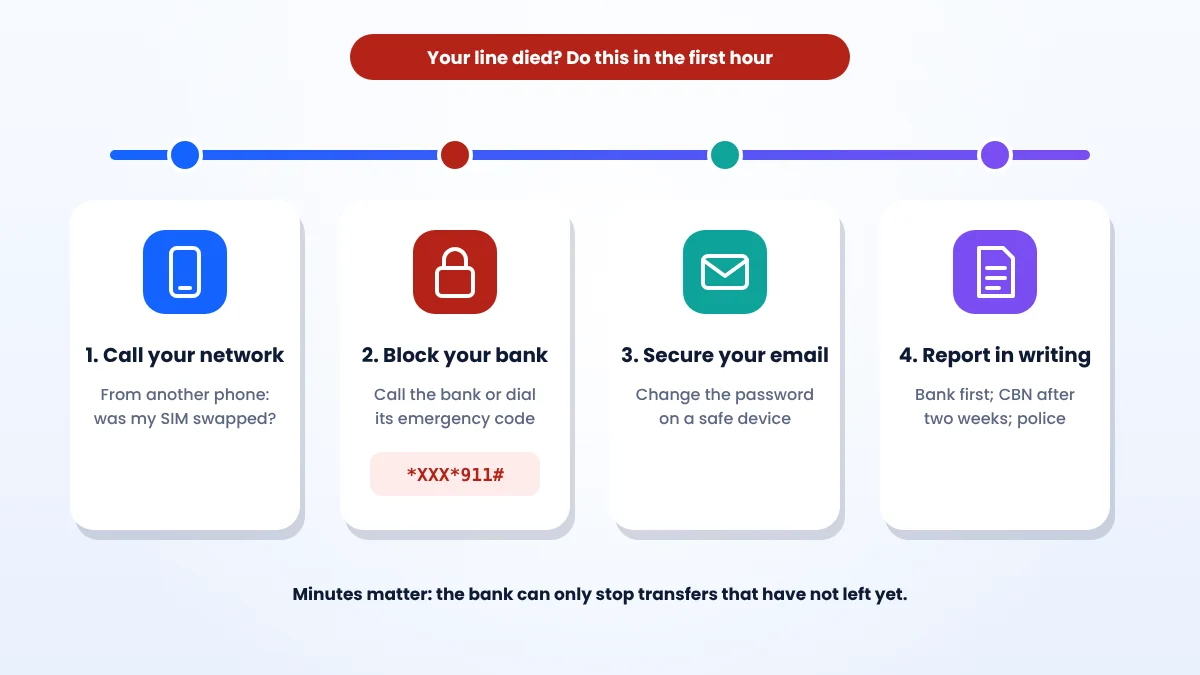
Act fast and in this order:
- Call your network from another phone. Ask whether your SIM was swapped. If it was, ask them to block the new SIM and return your line after verifying your NIN.
- Block your bank account. Call your bank, or dial its emergency USSD code from any phone, to freeze transfers. Do this even before you are sure.
- Secure your email. Change your email password from a safe device, because criminals use email to reset other accounts. If you use Gmail, follow our steps to secure your Gmail account.
- Check your accounts. Check your banking apps for transfers, new beneficiaries, or new devices, and note the times.
- Report it in writing. Send your bank a written complaint with the times and amounts. If the bank does not resolve it within two weeks, you can escalate to the CBN Consumer Protection Department. Also report the crime to the police.
The Central Bank of Nigeria and the Bankers’ Committee shared these emergency codes in a March 2024 scam alert. Dial the code from any phone and follow the prompts to block your account. Codes can change, so save your own bank’s code today and confirm it with the bank.
| Bank | Emergency code to block your account |
|---|---|
| Zenith Bank | *966*911# |
| GTBank | *737*51*74# |
| First Bank | *894*911# |
| UBA | *919*911# |
| Fidelity Bank | *770*911# |
| FCMB | *329*911# |
| Sterling Bank | *822*911# |
| Wema Bank | *945*911# |
| Ecobank | *326*911# |
| Keystone Bank | *7111*911# |
| Stanbic IBTC | *909*29# |
How to protect yourself from SIM swap fraud
You cannot stop a dishonest agent, but you can make yourself a much harder target:
- Guard your personal details. Never share your NIN, BVN, date of birth, or OTPs with anyone who calls or texts you. Your network and bank will never ask for an OTP.
- Set a SIM PIN. Most phones let you add a PIN to the SIM itself, under the security settings. It stops someone who steals your phone from using your SIM in another handset.
- Use your bank’s app, not only SMS. Many bank apps approve transfers inside the app, tied to your device. That is harder to steal than an SMS code.
- Use an authenticator app for email. Turn on two-step verification with an app such as Google Authenticator or a passkey, rather than SMS codes, for your email account.
- Add an email address for bank alerts. Then you still see alerts if your SIM stops working.
- Set sensible transfer limits. A low daily limit on your app caps how much a criminal can take in one day. Our guide on how to protect your bank account online explains the other settings.
- Keep your banking number active and up to date. If you stop using a line, update your bank first, before the number is recycled.
- Treat a dead line as an emergency. Call your network the moment your phone loses service for no clear reason.
For online shopping, a separate card with a small balance also limits the damage. Our guide to debit and prepaid cards explains how that works.
What banks and networks are doing about SIM swap fraud
Several changes in Nigeria make SIM swap fraud harder:
- NIN checks on SIM replacement. Networks must verify your NIN with NIMC before they replace a SIM. If you have not done it yet, here is how to link NIN to SIM.
- Device binding. A CBN circular of 12 March 2026 requires banks to bind banking apps to your device. It also caps new app activations at ₦20,000 for the first 24 hours, so a criminal who sets up your app on a new phone cannot move much at once. Our guide to device binding explains the rule in full.
- Swap checks for banks. In April 2026, the CBN and NCC signed an agreement to roll out the Telecom Identity Risk Management System (TIRMS). According to Ecofin Agency, it will let banks check in real time whether a number was recently swapped or reassigned.
The numbers show why this matters. According to the NCC, Nigerians lost about ₦12.5 billion to telecom-related financial crimes between 2019 and 2023. Meanwhile, bank losses to electronic payment fraud fell to ₦25.85 billion in 2025, about half the year before. NIBSS links the fall mainly to the BVN and NIN link-up.
Other countries face the same problem. For example, the FBI received 1,611 SIM swapping complaints in 2021, with losses of more than $68 million. In response, the US Federal Communications Commission adopted rules in November 2023 that require mobile carriers to verify customers before moving a number to a new SIM and to notify them when it happens.
Frequently asked questions
Can SIM swap fraud happen if I still have my phone?
Yes. SIM swap fraud does not need your phone. The criminal moves your number on the network’s side, so your phone simply stops working on that line.
Can a criminal empty my account with just my SIM?
Usually not. They also need something else, such as your password, PIN, or card details. That is why SIM swap fraud often follows a phishing message. So keep your PIN and passwords private, even if you think your SIM is safe.
Does an eSIM protect me from SIM swap fraud?
Not on its own. A criminal can ask your network to move your number to a new eSIM in the same way. The protection comes from strict identity checks and from your own quick reaction.
Will my bank refund money lost to SIM swap fraud?
It depends on the case. Report it to your bank in writing straight away, with times and amounts. If the bank does not resolve your complaint within two weeks, you can take it to the CBN Consumer Protection Department.
How do I know if my SIM has been swapped?
The clearest sign is a sudden loss of signal in a place where your phone usually works. Call your network from another phone and ask whether a SIM replacement was done on your number.
Is SMS OTP still safe to use?
It is better than no second step, but it is the weakest option. Where you can, use your bank’s in-app approval, an authenticator app, or a passkey instead. Our guide to passkeys for payments explains how they replace OTPs.
Key takeaways
- SIM swap fraud moves your phone number to a criminal’s SIM, so they receive your OTPs and reset codes.
- It usually starts with stolen personal details, often from a phishing message.
- A sudden “No service” in a good signal area is the main warning sign.
- Act in this order: call your network, block your bank account, secure your email, then report in writing. Our guide on what to do if your bank account is hacked covers the first 24 hours in detail.
- In-app approvals, authenticator apps, email alerts, and low transfer limits make you a much harder target.
To learn more about how money moves once a criminal starts a transfer, read how bank transfers work. You can also see what your card issuer does to check each payment.