AI tools no longer answer questions. A new kind, called an AI agent, can take actions for you: reply to customers, book appointments, update a spreadsheet, or draft an order. For a busy owner, that sounds like an extra pair of hands. However, an agent that acts on its own can also make costly mistakes. This guide explains how to use AI agents for small-business tasks, which jobs to assign them, and how to stay in control.
Quick answer: An AI agent is an AI tool that can plan and carry out tasks, not just write text. Small businesses can use AI agents to answer customer chats, book appointments, sort emails, and prepare reports. Start with one low-risk task, give the agent only the access it needs, keep a human approval step for anything involving money or customers, and check its work every week.
In this guide
- What are AI agents?
- What AI agents can do for a small business
- AI assistant vs AI agent
- How much control to give an AI agent
- How to start with AI agents, step by step
- Risks of AI agents
- Rules to keep AI agents under control
- How much AI agents cost
- Frequently asked questions
- Key takeaways on AI agents for small business
What are AI agents?
An AI agent is software that uses artificial intelligence to reach a goal by taking steps on its own. You give it a task, such as “reply to new WhatsApp enquiries and book viewings”. After that, it reads the message, checks your calendar, writes a reply, and books the slot.
By contrast, a chatbot or AI assistant mostly answers questions or writes drafts. As a result, you still copy, paste, and click. Our guide on how to use AI in a small business covers that simpler, assistant-style workflow.
So, the key difference is action. An agent can use tools, such as your inbox, calendar, shop, or chat app, and do things inside them. That power is useful, but it also means mistakes happen faster.
What AI agents can do for a small business?
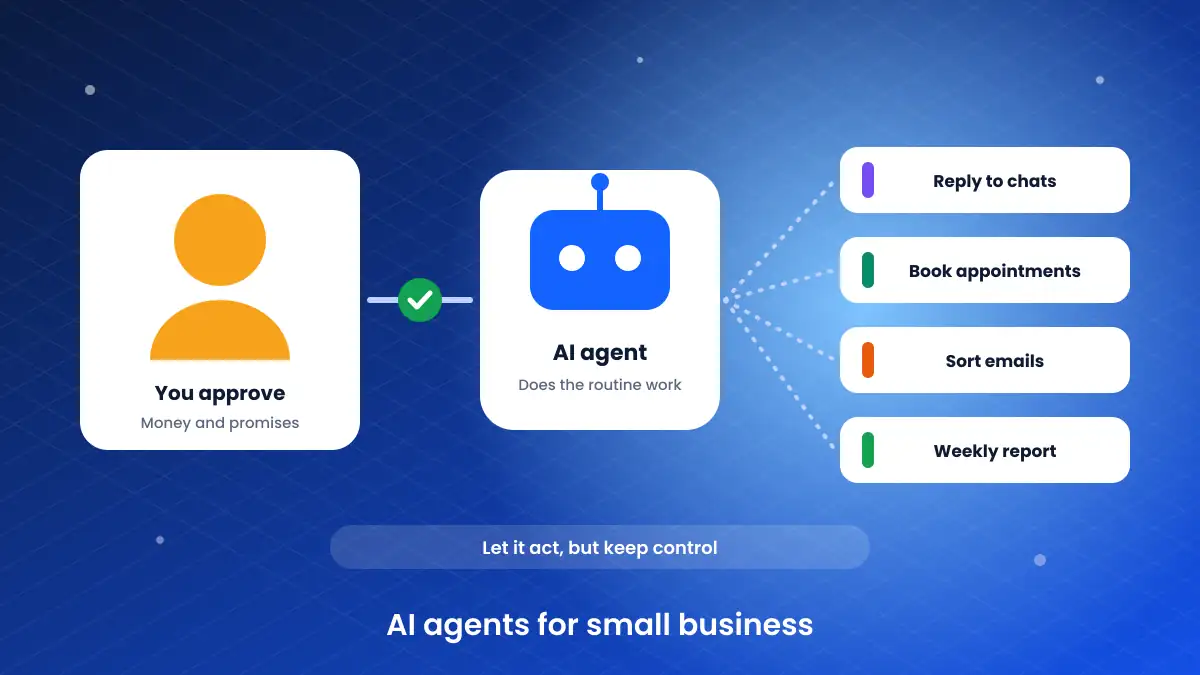
Here are common jobs that AI agents for small business owners already handle:
- Customer chats. Answer questions about prices, stock, and opening hours, then pass harder cases to you.
- Bookings. Offer free slots, book appointments, and send reminders.
- Lead follow-up. Ask new enquiries a few questions and flag serious buyers.
- Email sorting. Label messages, draft replies, and highlight urgent ones.
- Reports. Pull sales figures into a weekly summary.
- Research. Gather competitor prices or supplier options. Our guide to AI for business research shows how to check the results.
For example, Meta now offers an AI agent inside WhatsApp Business and Instagram messages. It can answer customer questions, recommend products, book appointments, and qualify leads, TechCrunch reported in June 2026. In addition, it can pass a chat to a person when needed.
AI assistant vs AI agent
The two terms are often mixed up. Here is how they compare:
| Feature | AI assistant | AI agent |
|---|---|---|
| What it does | Answers and drafts | Plans and takes actions |
| Who clicks “send” | You | The agent, unless you require approval |
| Access it needs | Usually none | Your inbox, calendar, shop, or chat app |
| Speed | Fast, but you finish the job | Faster, because it finishes the job |
| Risk if wrong | Low, because you check first | Higher, because it can act before you see it |
In short, an assistant helps you work, while an agent works for you. As a result, agents need more rules.
How much control to give an AI agent
Think of control as four levels. Move up only when the agent has proved itself at the level below:
- Suggest. The agent recommends what to do, and you decide.
- Draft. The agent prepares the reply or action, and you approve it.
- Act with limits. The agent acts alone on simple, low-value tasks, such as answering opening hours.
- Act and report. The agent handles a whole task and sends you a summary.
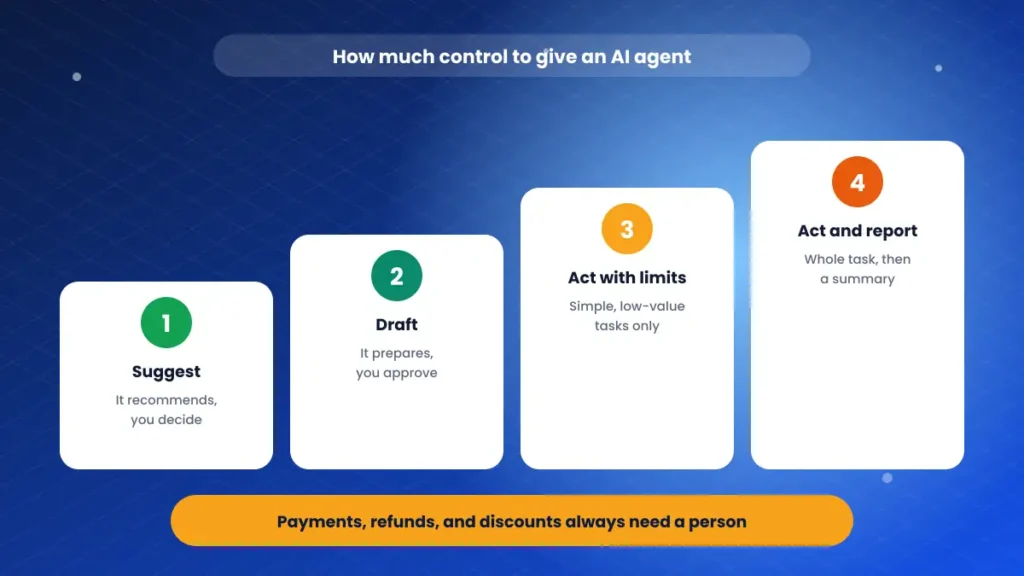
For this reason, keep payments, refunds, discounts, and contract terms at level 1 or 2. In other words, a person always approves anything that moves money or makes a promise.
How to start with AI agents, step by step
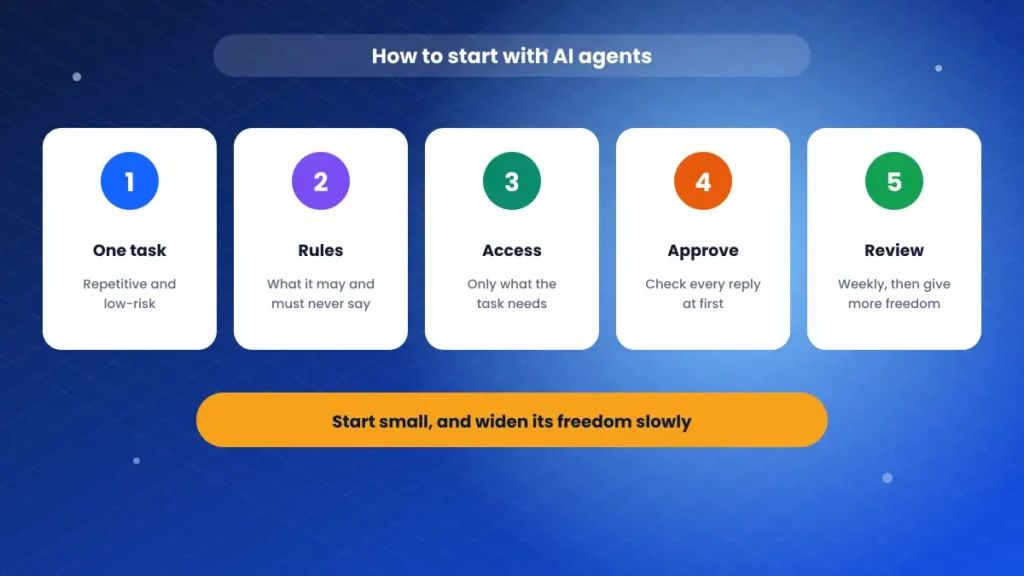
Follow these steps to try your first agent safely:
- Pick one task. Choose something repetitive and low-risk, such as answering common questions.
- Write the rules. List what the agent may say, what it must never say, and when to hand over to you.
- Give minimum access. Connect only the account the task needs, and use a separate business account where you can.
- Test with approval on. For the first two weeks, approve every reply or action before it goes out.
- Review and expand. Check the results each week. Then, give more freedom only where the agent did well.
Here is an example. A small clothing shop gets dozens of WhatsApp messages a day asking about sizes and delivery. The owner sets up an agent to answer those two questions only, using a price and delivery list she wrote. At first, she approves each reply for two weeks. Then, when Customer 1 asks for a discount, the agent hands the chat to her, because discounts are on the “never decide alone” list.
Our guide comparing WhatsApp Business vs WhatsApp explains which app you need first.
Risks of AI agents
However, agents bring new risks that a simple chatbot does not:
- Wrong answers, sent automatically. An agent can quote the wrong price or promise a delivery date you cannot meet.
- Prompt injection. A message, email, or web page can contain hidden instructions that trick the agent. The OWASP security project lists prompt injection as the top risk for AI apps, according to Invicti.
- Too much access. Similarly, OWASP warns about “excessive agency”, where an AI has more control than it needs.
- Customer data. Because chats contain names, phone numbers, and addresses, always check where the tool stores them.
- Costs that grow. Since some agents charge by usage, bills can rise with busy months.
- Hype. Many tools are simply chatbots with a new label.
The last point matters. In 2025, Gartner predicted that over 40% of agentic AI projects would be cancelled by the end of 2027, mainly because of rising costs, unclear value, and weak risk controls, Outlook Business reported. Moreover, Gartner estimated that only about 130 of the thousands of “agentic AI” vendors were offering real agents.
Meanwhile, scammers use AI too. Our guides to recognising a phishing message and deepfake scams explain what to watch for.
Rules to keep AI agents under control
Use these rules whatever tool you choose:
- Never give an agent your banking login or card details. Approve every payment yourself.
- Set clear handover points. For example, complaints, refunds, and large orders always go to a person.
- Use separate accounts. Give the agent a business email or chat account, not your personal one.
- Turn on two-factor authentication. Protect every account the agent can reach. Our guide to two-factor authentication shows how.
- Keep a log. Choose tools that record what the agent did and when.
- Review weekly. Read a sample of chats and fix the rules where the agent went wrong.
- Tell customers. Let people know when they are talking to an AI, and how to reach a person.
How much AI agents cost
Prices vary widely and change often. For example, some agents come inside apps you already pay for. Meta, for instance, plans to include its business agent in some tiers of the WhatsApp Business Premium subscription, while larger firms pay by usage, according to TechCrunch.
On the other hand, other tools charge a monthly fee per user, or per task. So, before you sign up, check three things: the monthly price in USD, any usage charges, and whether you can cancel easily. Our list of AI tools for small businesses includes free options to start with.
Frequently asked questions
What is the difference between an AI agent and a chatbot?
A chatbot answers questions. An AI agent can also take actions, such as booking an appointment or updating a record, using the apps you connect to it.
Are AI agents safe for a small business?
They can be, if you limit their access, keep a human approval step for money and promises, and review their work. The biggest risks are wrong answers and too much access.
Can an AI agent take payments for me?
Some agents can help with shopping and checkout, but keep payments under your control. Our guide to agentic commerce explains how agent payments work.
Will an AI agent replace my staff?
Usually not. Instead, agents handle repetitive tasks, so your team can focus on sales, service, and problems that need judgment.
What is the best first task for an AI agent?
Answering common customer questions is a good start, because it is repetitive, low-risk, and easy to check.
Key takeaways on AI agents for small business
- AI agents can take actions, such as replying to customers and booking appointments, not just write text.
- Start with one repetitive, low-risk task, and approve the agent’s work at first.
- Give the agent only the access it needs, and never your banking details.
- Keep payments, refunds, and discounts with a human.
- Review the agent’s work weekly, and watch costs, because many agent projects fail on value.
Want more practical AI ideas? Read our guides to creating a professional business email and accepting online payments, or browse all our AI and productivity guides.